
What every icon means
Most controls in the app are a drawing with no words. This is the whole set, what each one looks like, where it appears and what it does.
Why you would use it
You are holding a phone, the screen is mostly marks, and you want to know what the wheel beside send does before tapping it.
How to use it
Find the mark in the table. Every control that shows only an icon also carries
its name in aria-label, and public/icon-titles.js copies it into title,
so hovering it on a desktop shows a tooltip and a screen reader reads it out. A
phone has no hover, so there the name is for the screen reader only. No icon control in either band prints
its label on screen.
What you see
Agent marks
| Id | Drawing | Where | What it means |
|---|---|---|---|
brand-claude |
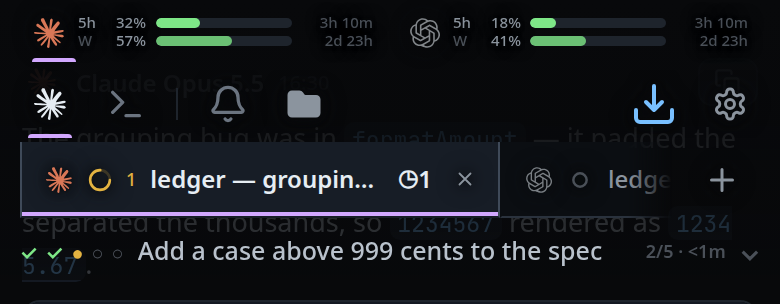
The Claude starburst | Tab strip, usage meters, reply cards, agent picker, resume rows | This tab, meter or reply is claude |
brand-codex |
The Codex knot | Same places | codex |
brand-opencode |
The opencode square | Same places | opencode |
Agent mode's chip in the mode strip wears the mark of the agent the tab is running, not a generic one.
Top bar and mobile icon rail
| Id | Drawing | Control | What it does |
|---|---|---|---|
i-plus |
Plus | #new-tab, #endpage-plus, #drawer-new |
Start a new thread |
i-update |
Circular arrow with a head | #update-ready |
A new build is installed and waiting; tap to reload. Shown only then |
i-folder |
Solid folder | #files-open |
Open the file explorer; on a wide screen, hide or show its column |
i-cog |
Gear | #settings-open |
Open Settings |
On a phone, the plus sits on the tab row right after the last tab. The strip shrinks to its tabs and scrolls on its own, so the plus stays in view however many tabs there are. The folder sits in the mode strip after Notify, and the cog closes the strip at its right edge. On a wide screen the folder stays next to Notify; the plus is hidden and each pane header carries its own. See the pane header table below.
Mode strip
| Id | Drawing | Control | What it does |
|---|---|---|---|
i-shell |
>_ prompt |
The Shell chip in #send-modes |
Send what you type to the tab's shell instead of the agent |
i-bell |
Bell | #notify |
Turn on a push notification when a tab finishes |
i-install |
Arrow into a tray | #install |
Install the app to the home screen. Shown only while the browser offers it |
On a wide screen the Agent and Shell chips are not shown here; the bell and the install arrow are, on the one row at the top. The shell keypad stays in the bottom band while the focused pane is in Shell mode.
Pane header
Only on a wide screen, where every tab group has a header of
its own. The buttons are .pane-btn and are found by data-act or data-mode.
| Id | Drawing | Control | What it does |
|---|---|---|---|
i-plus |
Plus | data-act="new-tab" |
Start a new thread in this pane |
| The agent's mark | The pane thread's brand mark | data-mode="agent" |
Send what you type to the agent. See agent-or-shell-mode |
i-shell |
>_ prompt |
data-mode="shell" |
Send it to this pane's shell instead |
i-split-right |
A box divided down the middle | data-act="split-right" |
Put a second pane beside this one (Ctrl+D) |
i-split-down |
A box divided across | data-act="split-down" |
Put a second pane under this one (Ctrl+Shift+D) |
i-zoom |
Four corners | data-act="zoom" |
Fill the pane area with this pane (Ctrl+B z). Not shown while there is one pane |
i-close |
Cross | data-act="close" |
Close this pane — the tab stays open. Not shown while there is one pane |
Composer
| Id | Drawing | Control | What it does |
|---|---|---|---|
i-mic |
Microphone | #mic |
Start dictating into the message |
i-stop |
Rounded square | #mic while recording |
Stop the recording |
i-upload |
Arrow up over a line | #mic while busy |
The clip is being sent to VCode to be transcribed |
i-wave |
Five bars | #mic while busy |
The VCode machine is transcribing the clip |
i-download |
Arrow down over a line | #mic |
The live text speech model is downloading, with the percentage in the label |
i-retry |
Circular arrow, counter-clockwise | #mic |
The last transcription failed; tap to retry it |
i-steer |
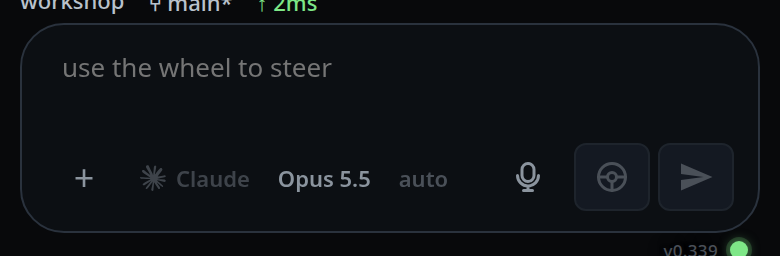
Steering wheel | #steer |
Push this message into the turn already running |
i-send |
Solid paper arrow | #send |
Send. The one filled mark in the set, because it is the primary action |
In the conversation
| Id | Drawing | Where | What it does |
|---|---|---|---|
i-copy |
Two rectangles | Reply cards, code block headers, beside every link in shell output | Copy that text or that URL |
i-check |
Tick | A copy button just after a successful copy, an accepted file, the toast | Done, or accepted |
i-edit |
Pencil on a page | Your own messages, queued messages, tab rows | Put that text back in the composer, or rename the tab |
i-diff |
Page with a plus and a minus | The header of a diff card, #viewer-diff |
Open the full review of that change; in the file viewer, show the changes since the last commit |
i-file |
Page | The reply footer, the status bar's changes segment | Files this turn changed; tap to list them |
i-close |
Cross | Sheet and popup close buttons, attachment chips, queued messages, tab rows, the toast on failure | Close, remove, drop — and on the toast, that something failed |
Tabs and sessions
| Id | Drawing | Where | What it does |
|---|---|---|---|
i-down |
Chevron down | The folder box in the new-thread form | Show the folder list |
i-folder |
Solid folder | Threads sheet rows | Move this tab to another folder |
i-reopen |
Arrow curling back | Closed rows in the Threads sheet | Reopen a closed tab |
i-trash |
Bin | Closed rows | Delete permanently. Tap once to arm — the mark is replaced by Delete? — and again to confirm; it disarms after 3 seconds |
i-resume |
Circular arrow with a head | Resume rows in the Threads sheet | Adopt a session started outside the app |
File explorer
| Id | Drawing | Where | What it means |
|---|---|---|---|
i-twistie |
Thin chevron right | Folder rows in the explorer | The folder is closed; the row turns it down as the folder opens. File rows carry the Seti theme's glyphs instead, from public/seti.woff |
i-collapse |
Two chevrons meeting | #explorer-collapse |
Collapse every open folder |
i-panel-close |
Panel with a left arrow | #explorer-toggle |
Hide the file explorer panel |
i-panel-open |
Panel with a right arrow | #explorer-rail |
Show the hidden file explorer column |
i-steer |
Steering wheel | #viewer-insert |
Put this file's path into the message |
Sign-in card
| Id | Drawing | Where | What it means |
|---|---|---|---|
i-lock |
Padlock | The cell at the left of the AUTH_TOKEN field on the sign-in card |
The field takes the token that unlocks this box. A mark, not a button |
i-copy |
Two rectangles | #auth-copy, at the end of the command row |
Copy grep AUTH_TOKEN= ~/.config/v-code/env |
Status marks
On the tabs, the thread rows and the subagent strip. The shape says the state and
the colour confirms it. Drawn by statusDot() in public/app.js in a 14px box.
The three amber states share one ring; on a tab everything is drawn smaller.
| State | Drawing | What it means |
|---|---|---|
idle |
Grey ring | Nothing running |
working |
Amber dot breathing inside a faint amber ring | A turn is running; also the offline banner and the subagent strip's label |
orbit |
Amber arc spinning on the same faint ring | The turn is over, but background agents still run |
working ring |
The spinning arc with the breathing dot inside | A turn is running and background agents too |
waiting |
Red disc with !, pulsing |
The agent waits on you |
done |
Green disc with a check | Finished |
failed, exited |
Red disc with a cross | Failed, or the process ended |
Under prefers-reduced-motion the arc stops spinning and the dot stops breathing;
the shapes stay.
Limits and known gaps
- The set is fixed. There is no icon theme and no way to add one.
- A pane header with no thread in it has no agent to draw, so its Agent button falls back to a filled dot.
- Labels never show.
.chip .clisdisplay: nonein every layout, so the Keys, Notify, Install, Agent and Shell chips are marks alone even when selected; a selected chip brightens and grows a bar under it instead. - Every mark is drawn on the same 24x24 grid with the same 2/24 stroke, round
caps and joins, and about 2 units of padding, so they read as one size. Only
i-sendandi-folderare filled; everything else is an outline incurrentColor.i-twistieis stroked at 1.5/24, VS Code's thin chevron. i-updateandi-resumeare the same circular arrow; they never appear in the same place.- Colour comes from the surrounding text, not from the icon, so the same mark is dim when inactive and bright when selected.
Related
- floating-chrome — which row each control sits in
- wide-layout — the pane header the second table describes
- wide-layout — where the same marks sit on a desktop
- the-three-agents — the three brand marks
- file-explorer — the rows the folder and file marks label
- dictate-a-message — the faces the mic cycles through
- log-in-with-the-token — the card the lock and copy marks sit on