
Queue or steer while the agent works
While a turn is running you can still type. Sending normally puts the message in a queue that runs when the turn ends. Sending it with the steering wheel pushes it into the turn that is already running.
Why you would use it
The agent is off editing files and you see it heading the wrong way. Waiting for the turn to end wastes the work; steering gets a correction in now. When the message is not urgent, the queue keeps it in order behind the current turn.
How to use it
With a turn running, type into the box (
#draft). The placeholder tells you which of the two you will get:use the wheel to steerwhen steering can reach the agent,queues until this turn endswhen it cannot.Tap the paper plane (
#send) to queue it.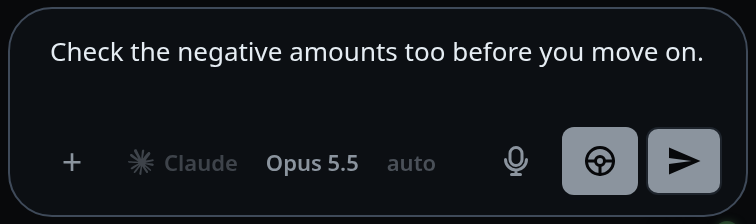
Tap the steering wheel (
#steer), left of the plane, to send it into the running turn instead.
What you see
- The steering wheel only appears while a turn is running and the agent can take a message mid-turn. It is not a mode you switch into; it is an action beside send, and it disappears when the turn ends.
- A queued message shows in the transcript as a card tagged
◷ QUEUEDwith the noteruns after the current turn. - A steered message goes straight into the transcript as a user message belonging to the running turn.
- Steering a message that cannot reach the agent is refused with the reason, not
silently queued:
no turn is running to steer into,the agent process is not running,<agent> is compacting its context; the message runs when that ends, or<agent> cannot steer mid-turn; it will run when the turn ends.
Options and settings
| Option | Default | What it changes |
|---|---|---|
#send |
queue | the message runs after the current turn |
#steer |
shown only when steering would land | the message joins the running turn |
Limits and known gaps
- opencode cannot steer. Its adapter reports
steerMidTurn: false, so the wheel never appears on an opencode tab and everything queues. - Steering into a compaction turn is refused. The agent is summarising, not working, and the message would be summarised away or lost.
- The wheel is also hidden for a turn claude started for itself. Your message takes that turn instead of joining it, so it gets an answer and a notification of its own (activity-line).
- The wheel is hidden in Shell mode.
- Steering is not offered for a message still sitting in the local outbox — the server does not have it yet, so there is nothing to promote.
Related
- manage-queued-messages — steering, editing or dropping a message already in the queue
- send-a-message — the plain send path
- stop-a-running-turn — ending the turn instead of talking into it
- activity-line — what the running turn reports while you type
- the-three-agents — which agent can take a message mid-turn