
See what the agent is doing right now
While a turn runs, the last thing in the transcript is a live card that says what the agent is doing, how long the turn has been going, and gives you a way to stop it.
Why you would use it
An agent can spend a minute inside one command with nothing to show. The line tells you whether it is writing an answer, running something, or thinking, so a quiet screen does not read as a hung app.
How to use it
Send a message. The card appears under the last durable card.
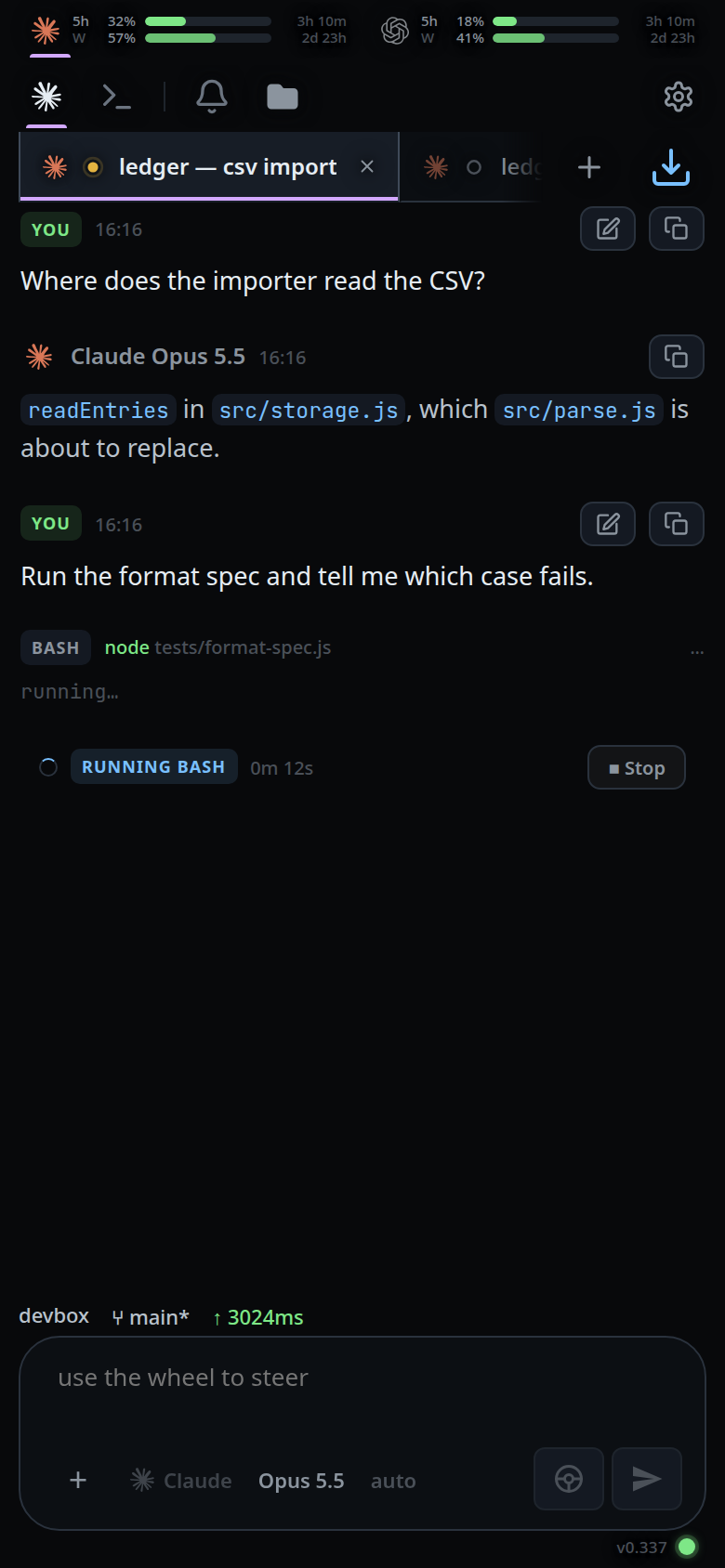
Read the label on the left and the timer beside it.

Tap
■ stopto interrupt the turn.
What you see
One of four labels, with a spinner:
| Label | Means |
|---|---|
WRITING |
the reply is streaming; the card holds the answer so far, rendered as markdown |
RUNNING <TAG> |
a tool call is open, e.g. RUNNING BASH; the card holds the command's raw output tail |
THINKING |
reasoning is streaming, or nothing has been reported yet |
COMPACTING |
the context is being summarised, not worked on |
After the label, the turn's elapsed time as 0m 12s, counting up, and the
■ stop button.
While text is arriving a ▌ cursor sits at the end. Command output is shown in
a monospace block, never as markdown, so a file the command printed cannot be
mistaken for prose. With no output yet the card is a single status line rather
than an empty box.
Order matters: visible output beats an open tool, which beats thinking. When the durable card for the message lands, the live card goes.
The card also comes up for a turn you did not send. Claude starts one for itself
when a background agent finishes, when a ScheduleWakeup fires, or when a cron
job comes due; the transcript has no message of yours at the top of it, and
everything else — the label, the timer, ■ stop, the tab's working dot — reads
the same as any other turn.
Limits and known gaps
- Only the last 1200 characters of reasoning or of command output are shown; the full text lands in the durable card.
- Codex does not stream command stdout, so
RUNNING BASHstays a bare status row there. - Only claude starts turns of its own. Codex and opencode work only when asked.
- The composer offers no steer wheel for one: a message you send takes the turn rather than joining it (queue-or-steer).
- A turn claude started for itself does not always report an end. It is closed after 30 minutes with no word from the CLI, and closed straight away when you send something — your message goes into the session rather than waiting behind it. Neither ending buzzes your phone, and if the CLI was only slow the next thing it says starts another turn.
- Compaction reports no percentage — the CLI only says it is still going every 30 seconds — so the elapsed time is the whole progress report.
- Stopping asks the agent to interrupt. Work already done stays in the transcript.
Related
- read-the-transcript — the cards under it
- auto-compact — what
COMPACTINGis doing - errors-and-retry — what shows when a turn stops badly
- stop-a-running-turn — what
■ stopdoes - status-bar — the same turn, one line high
- queue-or-steer — what the composer does while this card is up
- background-and-resumed-subagents — the helpers whose reports start a turn of their own
- switch-tabs — the same status as a dot on the tab