
Switch tabs from the strip
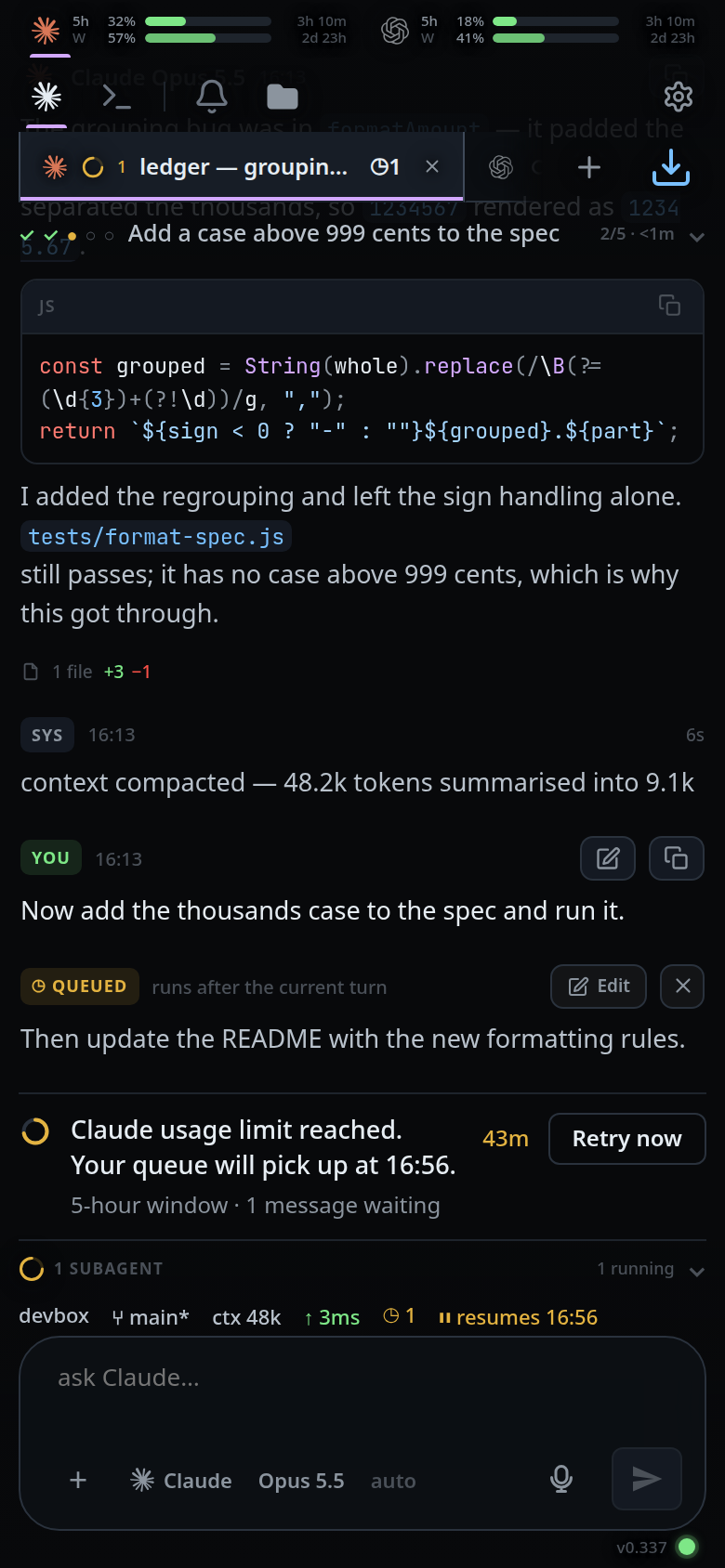
The row of tabs across the top (#tabstrip) is every open thread. Tap one to go
to it; each tab says which agent runs it, what it is doing, and how many
messages are waiting.
Why you would use it
It is the fastest way to move between threads, and the only place that shows all of them at once while you work. The badges are what let you leave a tab running and come back when it has something to say.
How to use it
- Tap a tab to select it. The transcript, composer, plan strip and file explorer all follow.
 2. Swipe the strip sideways when there are more tabs than fit. With a mouse,
turn the wheel over the strip: a vertical wheel scrolls it sideways.
3. Tap the plus after the last tab (
2. Swipe the strip sideways when there are more tabs than fit. With a mouse,
turn the wheel over the strip: a vertical wheel scrolls it sideways.
3. Tap the plus after the last tab (#new-tab) to start a tab — it opens
the new-thread card, the same thing Ctrl+T opens. Renaming, moving,
reordering, closing and reopening are in the
Threads sheet, which /resume opens.
The phone strip uses the same desktop tab shape: tabs meet on a hairline, have square corners, and fill the lane's height. The selected tab is filled and edged down both sides, with its colour bar along the bottom.
On a window at least 760px wide #tabstrip is not shown at all: every pane has
its own strip in its header (.pane-tabs) holding the tabs that pane keeps. They
keep the desktop tab bar shape: a longer name on each tab, square corners
and the header's full height, one tab meeting the next on a hairline, the first
of them flush with the pane's own edge, the tab you are in filled and edged down
both sides — down one side where it starts the lane, the pane's own line being
its other edge — and a highlight under the pointer. Under a mouse or a trackpad,
the tab you are in carries a close cross (.tabclose) and so does the tab the pointer
is on; see
close-and-reopen-tabs. The pane header is pictured in
wide-layout.
What you see
Each tab carries, left to right:
- the agent's brand mark (Claude, Codex or OpenCode)
- a status mark, whose shape says the state: a grey ring for
idle, an amber dot forworking, a red disc with!forwaiting, a green check fordone, a red cross forfailedandexited. The amber dot sits in a faint amber ring. With background agents running, an idle tab shows an amber arc spinning on that ring, and a working tab the spinning arc with the dot inside. Under reduced motion nothing spins or pulses. A turn claude starts for itself — a background agent finishing, a wakeup firing — wears the working dot like any other (activity-line) - the number of background agents running in that tab, when there are any
- the tab's name — its title, else the agent's name, else
thread ◷Nwhen N messages are queued in that tab, counting both the server's queue (manage-queued-messages) and anything still in this device's offline outbox (queue-a-message-offline)- a coloured bar under the selected tab, in the tab's colour, violet when it has none
Long-pressing the tab shows its tooltip: <agent> · <status> · <folder>, and
with background agents the status reads idle · 2 agents running.
The strip fades at its right edge only while there is more to scroll to. Selecting a tab from the drawer or the sheet scrolls the strip to centre it.
On a wide window with a mouse or trackpad, the composer takes the caret as
soon as you pick a tab, from the strip, the drawer, the sheet or Ctrl+PageDown
— a tab is for typing into, and this saves the click into the box. It is not
taken from a field you are typing in, or while a sheet, popup or drawer is over
the screen. A phone, and a touchscreen tablet at that width, are left alone: the
focus there would raise the soft keyboard over the transcript you just tapped to
see.
On a wide window a tab you have clicked has focus, and Delete or Backspace
then closes it, the same as its cross.
To the right of the plus sits the connection dot (#link-dot); offline it turns
and reads OFFLINE. See
live-updates-and-reconnect.
Limits and known gaps
- The strip does not re-sort itself. A tab stays where it is when its agent speaks; order is yours and is changed by dragging, in the strip, the drawer or the Threads sheet.
- Threads whose agent has been retired are hidden from the strip entirely. Their
logs stay on disk under
VCODE_STATE. - The strip hides its scrollbar, so the only hint that there is more to reach is the fade at the right edge.
- On a phone only the tab you are in shows a close cross. Select a tab first to close it from the strip, or close it from the drawer or the Threads sheet.
- A wheel turned over a strip that already fits, a sideways wheel from a
trackpad, and a wheel with
Ctrlheld are left to the browser.
Related
- navigation-and-commands — every gesture and key, phone and desktop
- swipe-between-tabs — the same move with a thumb
- tab-drawer — the list version of the strip
- threads-sheet — the full manager, behind All threads in the new-thread card
- reorder-tabs — moving a tab along the strip
- subagents-strip — the background agents the ring and the count report
- the-three-agents — the brand marks on the tabs
- status-bar — the same state, in words
- close-and-reopen-tabs — the cross on a tab, and what a close does to the selection
- wide-layout — the strip as a desktop tab bar
- type-to-start-a-message — what typing does when the box has not been given the caret
- start-a-thread — which end of the strip a new tab opens at
- split-panes — a strip per pane, and dragging a tab between them