
Close, reopen and delete a tab
Closing a tab stops its agent and takes it out of the strip; the conversation stays on disk and the Threads sheet brings it back. Deleting is the one irreversible step, and only a closed tab can be deleted.
Why you would use it
You finish a piece of work and want the strip back to the tabs you are actually using, without losing what was said. Later you want the log gone for good, with its attachments.
How to use it
To close:
- Tap the cross (
.tabclose) on the tab you are in. On a phone only that tab shows one; the rest have no cross, so their names keep the room. A tap on the cross within half a second of selecting the tab is ignored on a phone, so a double tap selects a tab without closing it. Or - tap the cross on the row (
.wsclose) in the tab drawer (#drawer) or in the Threads sheet (#sessions), or - on a window at least 760px wide, click the cross (
.tabclose) on the tab. With a mouse or a trackpad the tab you are in always shows its cross, and the rest show one when you point at them. You can also select a tab and pressDeleteorBackspace, or - press Ctrl+W (⌘W on a Mac) for the tab you are in, at any width. On a
running tab the first press shows
Running. Ctrl+W again within 3s stops the turn and closes the tab, and a second press within three seconds closes it, or - type
/exitin the tab and send./quitis the same command.

A tab with a turn in flight, or with background agents still running, asks
twice. The first press turns its cross red and holds it up for three seconds;
its tooltip reads Close <name>? The running turn stops. A second press on the
same tab closes it. Anything else — three seconds passing, or a press on another
tab — puts the cross back.
To reopen:
- Open the Threads sheet: tap the plus and then All threads in the card's
header, send
/resumein the composer, or tap the branch segment in the status bar. - Find the CLOSED section (
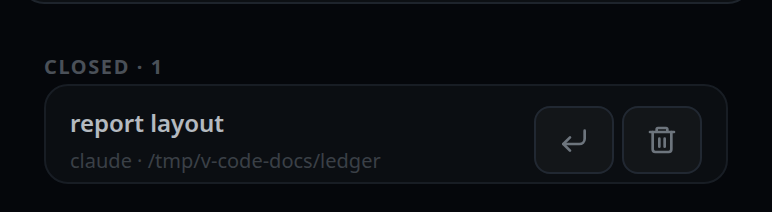
#closed-section) — it appears only when there are closed tabs, with the count beside the heading. - Tap the reopen arrow on the row. The tab comes back and is selected.
To delete for good:
- In the same CLOSED section, tap the bin on the row.
- The button changes to Delete?. Tap it again within three seconds to confirm.

What you see
Closing takes the tab out of the strip at once. Closing the tab you are in moves you to another:
- From the strip's cross, a
Delete/Backspacepress, or the tab drawer's cross, its neighbour takes over: the tab on its left, or at the left end the one on its right. - From
/exitit is the tab to the left. At the left end, the tab to the right takes over; when it is the only tab, a new tab like this one — same agent, folder, model and effort — is opened instead. On a phone it takes the closed tab's place at the front; on a window at least 760px wide it opens at the back of the strip, where every new tab there opens (start-a-thread). - From a row in the Threads sheet, which says nothing about where to go, the first tab is selected.
Each closed row shows the tab's name (its title, else its folder, else tab) and
under it <agent> · <folder>, the folder written ~-short.
A delete that is not confirmed within three seconds disarms itself and the bin comes back. After a successful delete the row disappears; when the last one goes, the CLOSED section hides itself.
Options and settings
| Option | Default | What it changes |
|---|---|---|
/exit, /quit |
— | Closes the tab you are in |
Limits and known gaps
- Closing is reversible and never destroys a conversation: the log is untouched on disk.
- A closed tab keeps its place in the order, so reopening puts it back where it was.
- Deleting is refused unless the tab is already closed:
close the thread before deleting it. - A delete takes the thread's directory with it, which includes every attachment in that thread.
- There is no bulk delete and no expiry. Closed tabs stay listed until you delete them.
- The composer draft you had in that tab is forgotten on this device when the tab is closed or deleted. See drafts-kept-per-tab.
Related
- navigation-and-commands — every gesture and key, phone and desktop
- threads-sheet — where the closed list lives
- tab-drawer — the other place with a close button
- switch-tabs — the strip the cross lives on
- wide-layout — where the cross appears
- new-tab-command —
/new, the opposite of/exit - reorder-tabs — why reopening puts the tab back where it was
- drafts-kept-per-tab — the draft a close forgets
- thread-state-on-disk — what a delete removes
- open-an-attachment — the attachments that go with it