
The tab drawer
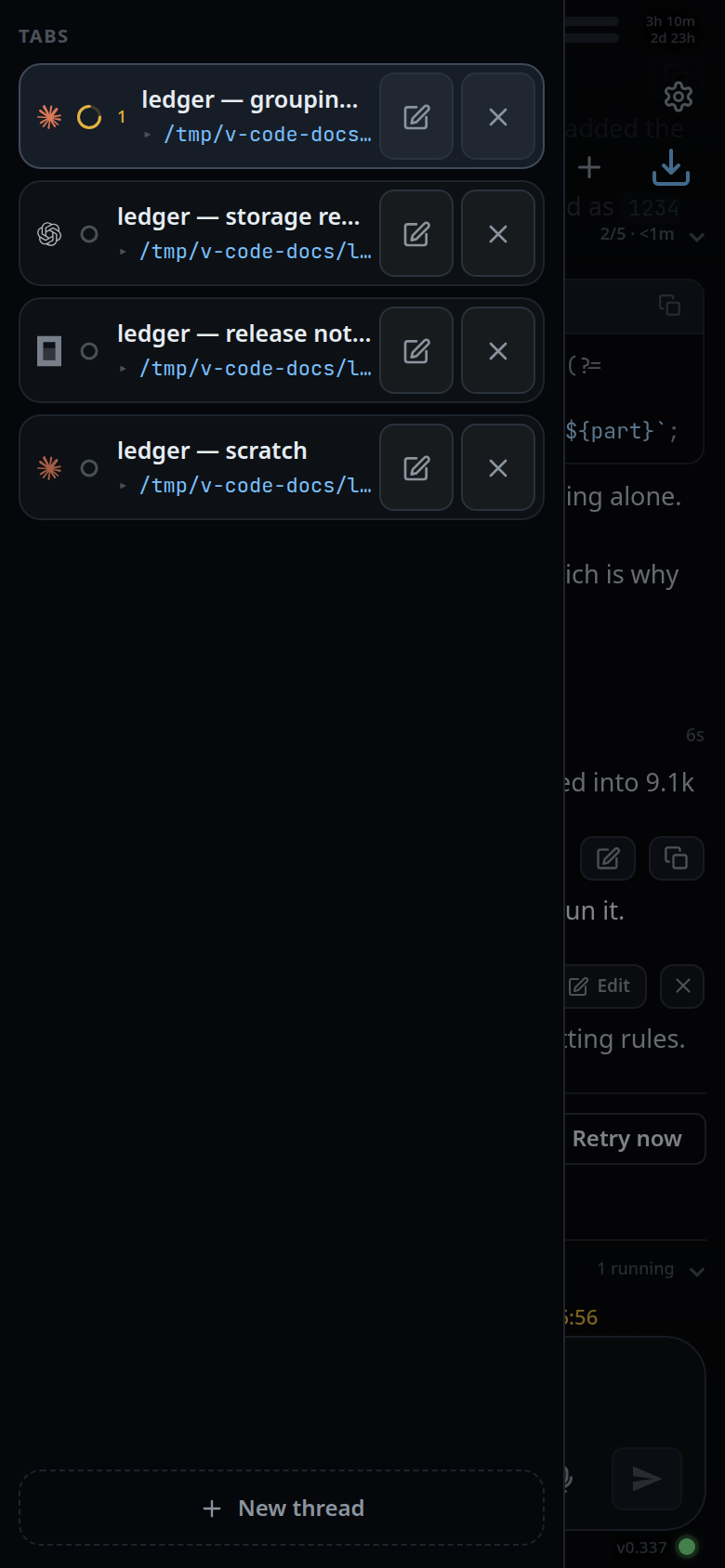
Pull in from the left edge of the transcript for a list of the open tabs
(#drawer). Pick one, rename it, close it, drag it somewhere else in the order,
or start a new one.
Why you would use it
The strip shows a dozen tabs as small targets with short names. The drawer shows the same tabs as full-width rows with their folder underneath, which is what you need when several tabs share a repo or a name is too long for the strip.
How to use it
- Put a finger on the left tenth of the transcript and drag right. The panel follows your finger.
- Release past about 36 px to open it; less snaps it shut.
- Tap a row to go to that tab. The drawer closes behind you.
 4. Tap the pencil on a row (
.wsedit) to rename it in place; tap the cross
(.wsclose) to close that tab.
5. Press and hold a row, then drag it up or down to reorder the tabs.
6. Tap New thread at the bottom (#drawer-new) to open the new-thread card.
7. To put the drawer away, drag it back towards the left edge past about 70 px,
or tap the dimmed transcript beside it (#drawer-scrim), or press the
phone's back button.
What you see
A panel headed TABS with one row per open tab. Each row shows the agent's
brand mark, the status dot and the background-agent count, the tab's name (its
title, else its folder, else tab), and under it the folder with a ▸ in front,
written ~-short. A coloured tab wears its colour as the row's border, full
strength on the tab you are in.
The tab you are in is highlighted. The transcript behind dims as the panel comes in, and one short vibration marks the moment the drawer commits.
The drawer is the same gesture at every width. It never becomes a column: on a wide window the tab strip is the one list of tabs, shaped as a desktop tab bar. See wide-layout.
Options and settings
| Option | Default | What it changes |
|---|---|---|
| edge zone | the outer 10% of the frame's width | Where a touch starts the drawer instead of a tab swipe |
| open distance | 36 px | How far in you must drag to open it |
| close distance | 70 px | How far back you must drag to shut it |
| axis slop | 9 px | Vertical drift before the touch is handed back to the scroller |
Limits and known gaps
- Touch only, at every width. On a desktop pointer there is no button that opens the drawer; use the tab bar or the Threads sheet.
- The drawer is a picker, not the manager. It has no folder move, no closed-tab list and no status line; those are in the Threads sheet.
- While a row is being dragged the panel refuses to close out from under it.
- A finger that drifts more than 9 px down the screen before the drawer has picked its direction gives the touch back to the scroller, and the panel disappears again.
Related
- switch-tabs — the strip
- reorder-tabs — the drag in full
- rename-a-tab — the pencil on a row
- threads-sheet — the manager with everything else
- file-explorer — the same drawer on the right edge
- wide-layout — the tab bar a wide window gets instead
- back-button — the third way to put it away