
Rename a tab
Give a tab a name of your own, either by editing it in the tab list or by typing
/rename <name> in the composer. The name shows in the strip, the drawer and the
Threads sheet.
Why you would use it
A tab is named after its folder until you say otherwise, so three tabs on one repo read as the same row three times. A name is what tells them apart.
How to use it
From a list:
- Open the tab drawer (
#drawer) or the Threads sheet (#sessions). - Tap the pencil on the row (
.wsedit, labelled "Rename"). - Type the name in the field that replaces it.
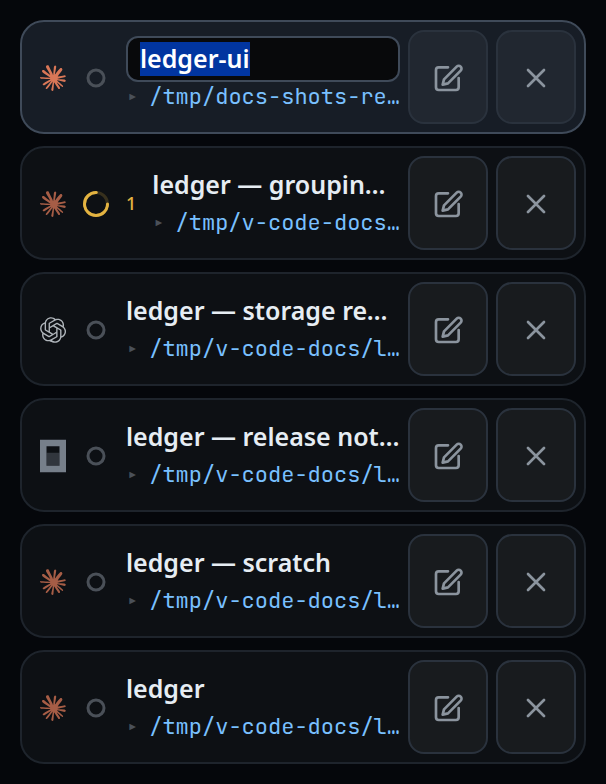
- Press Enter, or tap away, to save. Press Escape to discard.

From the composer:
- Type
/rename my taband send./r my tabworks the same. - On a Claude tab, a bare
/renamewith no name is passed to the Claude CLI, which invents a name; the tab takes whatever name it reports.
What you see
The row's name becomes a text field with the current name selected. Saving repaints the strip, the drawer and the sheet at once.
A bare /rename on Codex or OpenCode, and a bare /r anywhere, shows the toast
rename: add a name — /rename my tab.
A rename to nothing is refused by the server with a tab needs a name, and the
tab keeps the name it had.
Options and settings
| Option | Default | What it changes |
|---|---|---|
/rename <name> |
— | Sets the name on any agent |
/r <name> |
— | The same command |
bare /rename |
Claude only | Sent to the Claude CLI, which picks a name |
| name length | — | Trimmed, and cut at 80 characters, however it arrives |
Limits and known gaps
- Tapping away from the field saves rather than discards: on a phone the keyboard's own dismiss button blurs the field, and losing the name to that would be worse. Escape is the way to abandon an edit.
- While a name is being edited the tab lists stop repainting, so a change made on another device appears only once the edit finishes.
- Only Claude's CLI has a rename of its own. Codex and OpenCode never invent a name.
- A message that merely talks about renaming is not a rename: a bare-only command followed by prose is treated as prose.
Related
- tab-colours — the other way to tell tabs apart
- tab-drawer — where the pencil lives
- threads-sheet — the same edit in the manager
- the-three-agents — why only Claude invents a name
- vendor-slash-commands — what happens to a command VCode does not run itself