
Colour a tab
/colour blue paints a tab: the bar under it in the strip, its row's border in
the tab lists, and the composer's edge while you are in it. The cog can also
colour every new tab for you.
Why you would use it
Names take reading; colour does not. On a phone, a coloured composer edge tells you which tab you are typing into before you look at anything else.
How to use it
In the tab you want to colour, type
/colour blueand send./colorworks the same.
/colour nonetakes the colour off.defaultandoffdo the same.Type
/colouron its own to see the list of names.To colour new tabs automatically, tap the cog (
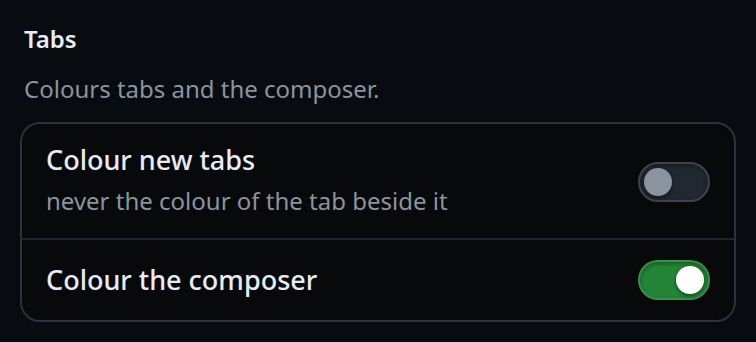
#settings-open), find the Tabs group (#settings-tabs) and turn on Colour new tabs (#tabs-auto-colour).To stop the composer picking up the tab's colour, turn off Colour the composer (
#tabs-tint).
What you see
The names are red, orange, yellow, green, cyan, blue, purple and
pink.
A coloured tab shows the bar under the selected tab in that colour — violet when it has none — its row in the drawer and the Threads sheet wears the colour as a border (dimmer when it is not the tab you are in), and the composer's edge takes the colour, brightening when the composer has focus.
A bare /colour toasts
colour: /colour red, orange, yellow, green, cyan, blue, purple, pink, or none.
An unknown name is refused by the server:
no colour called <name> — pick one of red, orange, yellow, green, cyan, blue, purple, pink, or none.
With Colour new tabs on, a new tab takes the colour after its neighbour's, so
two tabs side by side never match. A tab with no neighbour takes red.
Settings save the moment you flip them; the right end of the group's title
shows Saving…, then a green check and Saved.
Options and settings
| Option | Default | What it changes |
|---|---|---|
/colour <name> |
— | Sets the colour. Case-blind |
/colour none | default | off |
— | Takes the colour off |
Colour new tabs (#tabs-auto-colour) |
off | Every tab created from now on gets a colour |
Colour the composer (#tabs-tint) |
on | Whether the composer's edge wears the tab's colour |
Limits and known gaps
- Eight names, fixed. There is no custom colour and no hex value.
- The shades themselves live in
public/styles.css; the name is all that is stored. - "Colour new tabs" applies only at creation. Turning it on does not colour the tabs you already have.
- The two switches are server-side settings, so they are the same on every phone that logs in.
Related
- rename-a-tab — the other way to tell tabs apart
- switch-tabs — where the bar appears
- threads-sheet — the rows that wear the border
- tab-drawer — the other list with the border
- send-a-message — the composer the colour tints
- toasts — where an unknown colour name is reported
- stream-detail-levels — the Transcript group, next in the settings sheet