
When the app talks back
A short message slides in under the top band when something happened that you cannot already see. Anything you can see is not announced.
Why you would use it
So you can tell a silent app from a broken one. If you switch model and nothing says anything, that is the design: the chip already changed. If a command failed, you get a message.
How to use it
Nothing to operate. Tap the message (#toast) to dismiss it early.
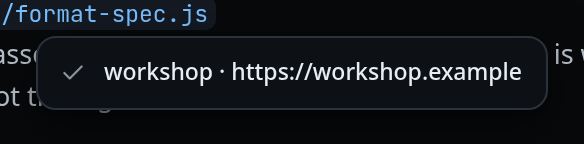
What you see
- A grey card centred under the icons, with a gap so it covers neither the chips above nor the composer below.
- A tick in front of a success, a cross in front of a failure. No colour: the toast stays grey either way.
- It hides itself after 3.2 seconds, or when you tap it.
- It is announced to screen readers (
role="status",aria-live="polite").
Messages you will actually meet, worded as the app words them:
| Toast | When |
|---|---|
sent C-c to pane |
A key from the Keys tray |
shell unavailable: tmux not running |
The shell refused the keys |
new tab in <folder> |
/new created a tab |
nothing to clear yet |
/clear with nothing to clear |
<name> · <url> |
You tapped the machine name in the status bar |
<n> queued |
You tapped the queue count |
Limits and known gaps
These actions deliberately say nothing when they work, because the screen already shows the result:
- Changing model, effort or agent — the chip changed.
/handoff— the composer and the cards changed./clear— it writes its own marker into the conversation.- Renaming, moving, closing or deleting a tab — the tab list changed.
All of them still toast when they fail, with the error the server gave.
Related
- floating-chrome — the band it hangs from
- wide-layout — what it centres on when the window is wide
- icon-legend — the tick and the cross it wears
- machine-name — the tap that raises the name and the URL
- errors-and-retry — failures that get a card instead of a toast