
Hand a tab to another agent
Change the agent on a tab and keep the conversation: same tab, same title, same history. The new agent reads a written brief of the transcript with your next message.
Why you would use it
Claude hit a usage limit and you want codex to carry on. Or one agent has been going in circles and you want a second opinion with the same context, in the same tab, without retyping anything. Or the work moved from design to a bash-heavy job the other one is better at.
How to use it
Stop the running turn if there is one. A handoff is refused mid-turn.
Tap the agent button under the composer (
#agentpick) — the first of the three, right of+. It shows the agent's own mark and name, the same symbol the tab strip, the usage meters and every assistant card use.The list opens, headed
agent for this tab · now: claude. The agent already running is labelledrunning this tab nowand tapping it just closes the menu. Any other row readshand this tab over — it reads the transcript as a brief; tapping it hands the tab over.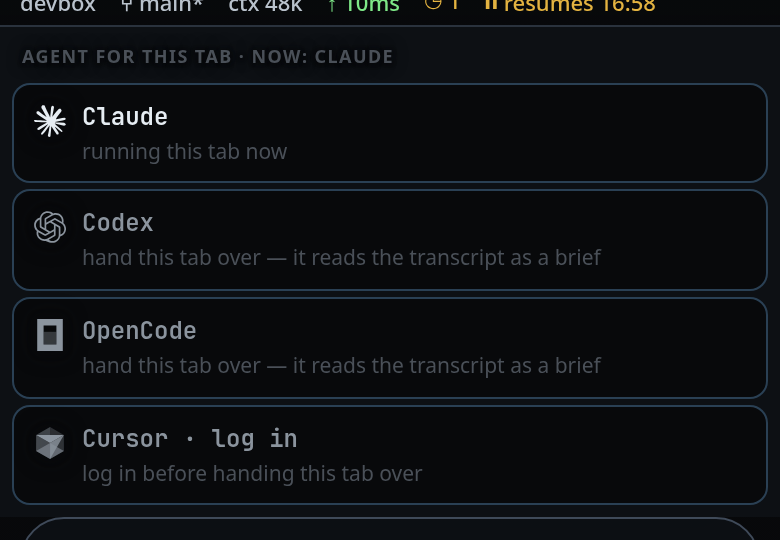
Send your next message. The brief goes in front of it, once.
Or type /handoff codex. /vendor, /harness and /agent are the same
command under other names — use whichever word you reach for. With exactly two
agents installed, a bare /vendor picks the other one. With more it is a
question rather than a change and toasts the choices, for example
vendor: codex or opencode.
What you see
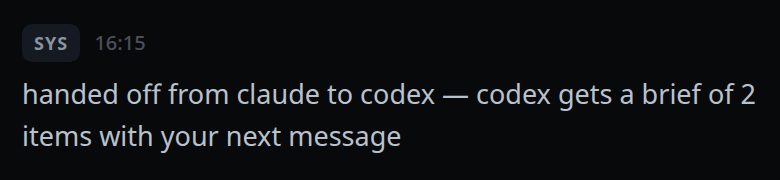
A system card in the transcript:
handed off from claude to codex — codex gets a brief of 18 items with your next message.
The handoff itself does not toast; a refusal does.
The agent button shows the new agent and its mark. The
model and effort
pickers reset to auto — a model id belongs to one vendor — so pick new ones if
you want something other than the CLI's default. The
send mode goes back to Agent, so your next
message goes to the agent and not to the
shell pane. Replies already in the
transcript keep the mark and the name of the agent that wrote them, so you can
see who said what.
Button tooltips:
- idle:
Agent: Claude — changing it hands this tab over - during a turn:
Agent: Claude — stop the running turn to hand this tab over, and the button is disabled
Refusals come back as toasts, in the server's words:
stop the running turn before handing this tab overalready running codexclaude is still starting; try again in a momentunsupported agent: <name>
Limits and known gaps
- The vendor session does not travel. claude's JSONL and codex's rollout are
different formats and neither CLI reads the other's, so the session is dropped
the way
/cleardrops it and the transcript travels as text. - The brief is capped at 24,000 characters, and one message inside it at 4,000.
It is built newest-first and then reversed, so the end of the conversation is
what survives; anything dropped is counted in a line reading
(N earlier items omitted). - The brief carries decisions, not bulk: your messages, the replies, one line per
tool call (
- tool Bash: npm test) and one per edit (- edited src/a.js (+12/-3)). Tool output is dropped — the new agent can re-run anything it needs. Reasoning, system notes, approvals and subagents are not carried at all, and are not even counted as omitted. - The brief is spent by the next turn. If that send fails, the brief is re-parked so the retry carries it again.
/clearafter a handoff discards the parked brief.- The context token count, the plan strip and the subagents strip are cleared with the session. Anything queued behind an agent that failed to start is drained into the new agent.
- The agent button is disabled with no tab open, while a turn is running, and while a handoff is already in flight.
- The list comes from the agents the server advertises, with synthetic entries filtered out, so an agent added or retired server-side needs no change in the UI.
Related
- the-three-agents — what changes when the agent changes
- clear-the-context — the other way to drop a session
- usage-limit-pause-and-retry — the reason most handoffs happen
- switch-the-model — the button to its right
- read-the-transcript — the per-reply agent marks
- errors-and-retry — the refusals a handoff can produce
- log-in-to-an-agent — a handoff to a logged-out agent logs in first