
Wait out a usage limit and resume automatically
When the agent's plan window is full, the tab pauses instead of failing. It tells you when it will resume, holds the queue, and picks the work up by itself ten minutes after the reset.
Why you would use it
You start something long, the five-hour window closes, and you are asleep. The thread should not be a dead end you have to notice and restart by hand.
How to use it
Nothing to do. If you want it sooner, or you want to take over:
- Tap
Retry nowon the usage line to try again immediately. - Or just type a message. Sending one cancels the armed retry — that is you taking over.
What you see
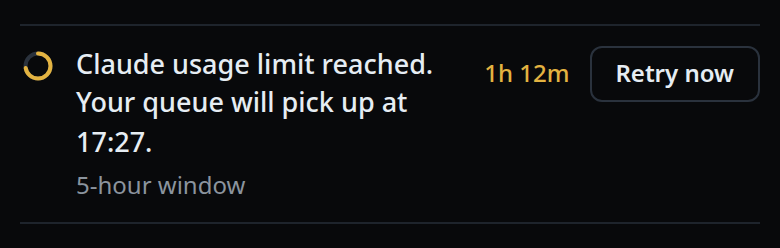
A line at the end of the transcript with a small amber ring, naming the agent and the time:
Claude usage limit reached. Your queue will pick up at 14:20.
Under it, in grey, the window and what is waiting, such as
5-hour window · 2 messages waiting. On the right, the time left in amber
(1h 12m) and Retry now.
A weekly limit says weekly window. A retry that is already due reads
Your queue picks up now. with no countdown. A window the vendor did not name
is left out rather than guessed, and with nothing queued either the detail reads
resumes on its own.
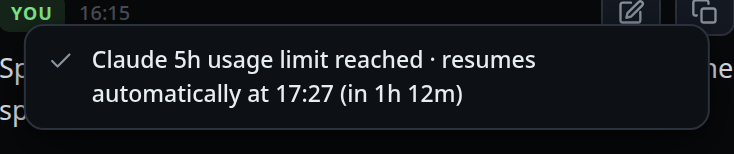
In the status bar, an amber segment: ⏸ resumes 14:20. Tapping it
shows the longer form as a toast:
Claude 5h usage limit reached · resumes automatically at 14:20 (in 1h 12m).
When the deadline arrives the tab sends a continuation of its own:
Continue from where you left off. The previous turn was paused by a usage limit; inspect the resumed session and finish the outstanding work.
Anything you queued while paused runs first, in order, then the continuation.
Limits and known gaps
- The retry is armed for ten minutes after the reset the vendor reported, not the reset itself.
- Nothing is scheduled when the reset cannot be read. Codex's rejection frame names
no window, so the reset is taken from the meters frame that preceded it, or from
the
try again at 11:14 AMin the message itself. With neither, no retry is armed. - A retry that is itself limited re-arms only for a deadline at least ten minutes later than the one it already waited for, so a run of rejections stretches out instead of looping.
- A limit codex is retrying on its own is a note, not a pause:
codex: usage limit reached, codex is retrying on its own. /clearand a handoff both cancel an armed retry: it would resume a session that no longer exists.- No compaction is queued ahead of the retry.
- opencode reports no account windows, so none of this applies there.
Related
- usage-meters — seeing the window fill before it closes
- hand-a-tab-to-another-agent — carry on with the other agent instead of waiting
- resume-after-a-restart — the other automatic continuation