
Switch the model for a tab
Each tab runs one model. Change it by tapping the model button under the
composer, or by typing /model.
Why you would use it
The tab was opened for a quick question on the cheap model and has turned into real work. Or the reverse: you are on the expensive model and about to ask something trivial. The model is per tab, so one tab can grind on a big refactor while another answers quick questions.
How to use it
Tap the model button (
#modelpick) in the row under the composer, between the agent's name and the effort. It shows the model this tab runs, orauto.The menu opens as a list of models, headed
model for claude · now: Opus 5.5, with a tick on the one this tab is already using. Tap another.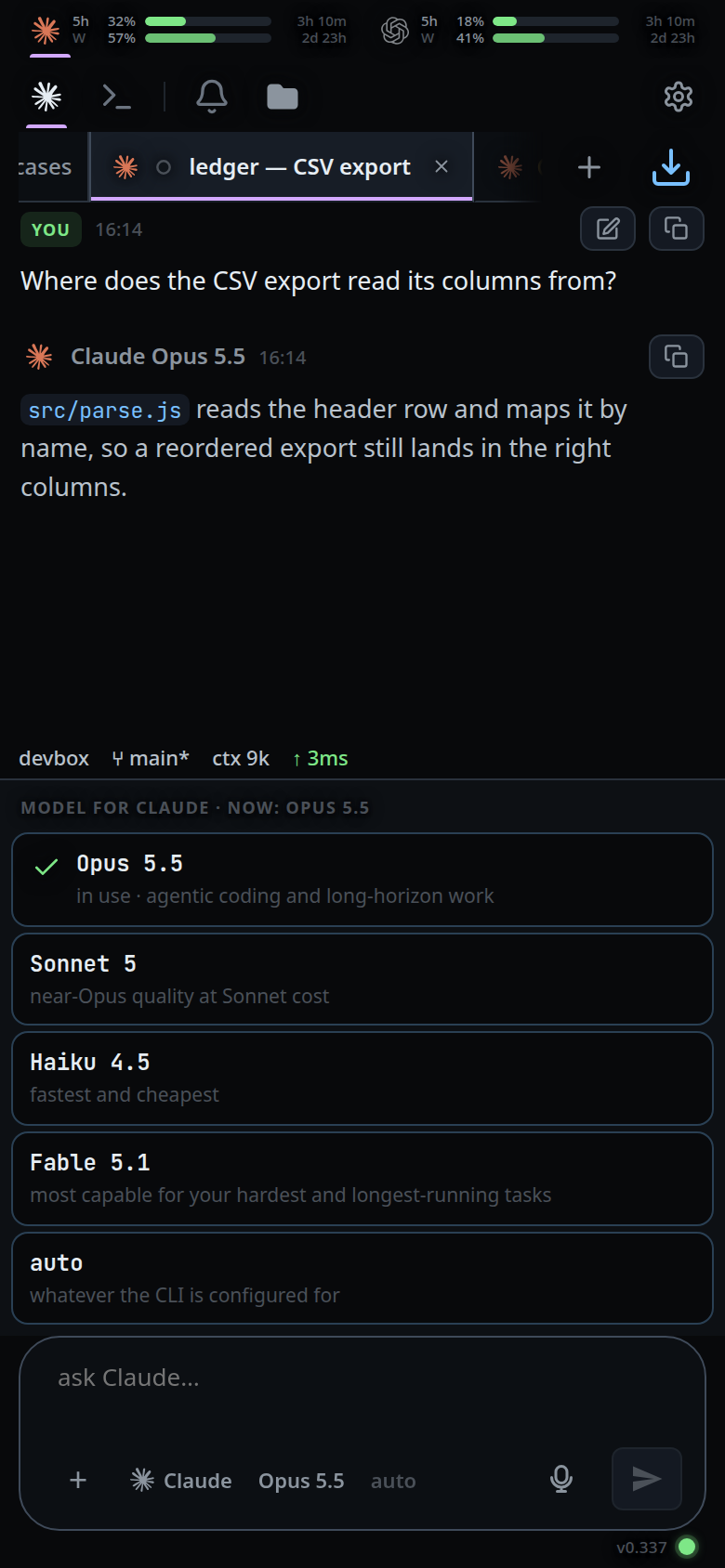
Or, by typing:
- Type
/model. The menu becomes the same list of models as soon as the word is finished — no space needed — and keeps filtering as you type a value. It works at the end of a message already written: picking a model there sets it and takes/modelout of the draft, leaving the message. - Send
/modelon its own to see what the tab is on instead. - Type
/model opusand send it to set it directly. The product name works too:/model Opus 5.5resolves toopus.
Both the picker and the typed command go through the same place, so they cannot mean different things.
What you see
- The button's label is the model's product name, not a caption:
Opus 5.5,GPT-5.6 Sol, orautoin a dimmed style when nothing is set. - Long ids are shortened for the label:
claude-opus-5-5[1m]reads asOpus 5.5, a trailing snapshot date is dropped, andgpt-5.6-solreads asGPT-5.6 Sol. - The model this tab is on carries a green tick in the menu, and its note starts
with
in use—in use · agentic coding and long-horizon work. It follows what the tab is really running:autoholds the tick only until the first turn, after which the agent reports the id it started with and that model's row takes it. - A point release is ticked on its family's row. Running
claude-fable-5-1ticksFable 5, and the header readsnow: Fable 5.1. - The tooltip is
Model: opus, orModel: whatever the CLI is configured forwhen nothing is set. /modelwith no argument answers with a toast:model: opus, ormodel: default.- A second tap on the button closes the menu.
Options and settings
claude (OPTION_VALUES in public/app.js):
| Value | Shown as | Note |
|---|---|---|
opus |
Opus 5.5 | agentic coding and long-horizon work |
sonnet |
Sonnet 5 | near-Opus quality at Sonnet cost |
haiku |
Haiku 4.5 | fastest and cheapest |
fable |
Fable 5.1 | most capable for your hardest and longest-running tasks |
default |
auto | whatever the CLI is configured for |
codex: gpt-6-astra, gpt-6-sol, gpt-6-luna, gpt-5.6-sol, gpt-5.6-terra, gpt-5.6-luna, gpt-5.5,
gpt-5.4, gpt-5.4-mini, gpt-5.3-codex-spark, and default. Their notes run
from the most capable — complex, demanding work to ultra-fast coding.
opencode has no table. Its models come from the list of agents the server
reports, because they depend on which providers it is logged into, plus default labelled
whatever the agent is configured for.
Cursor's models also come from that list, using the model IDs and names
advertised by ACP. The picker sends the exact ID ACP accepts (including any
bracketed parameters); the single auto row uses ACP's default[] model.
Limits and known gaps
Tapping the ticked row is not a no-op. It sends the alias, so a tab running
claude-opus-5-5[1m]that is ticked onOpus 5.5restarts on plainopusand loses the 1M-context variant.The setting is per tab, not global. A new tab opened with
/newcopies this tab's model.The value sent to the CLI is the alias (
opus), not the product name; the row's tooltip shows what will be sent.On claude and opencode the model is a process flag, so the agent process is stopped and the next turn starts a new one. Nothing is lost: that start resumes the same vendor session.
A change made mid-turn is held. The process that owns the turn keeps it, and the restart happens before the next turn.
On codex the model rides on
turn/startas an override, so it lands on the very next message with no restart.opencode's catalogue depends on which providers it is logged into. If discovery has not finished, the list can be empty and the client retries within the server's 60-second budget.
The button is disabled with no tab open.
Choosing a model from the menu does not clear your half-written message. Only when the draft is the command (
/model …) is the box emptied.
Related
- set-the-effort — the dial beside it
- slash-menu — the menu both controls open
- the-three-agents — which agents apply a model without restarting
- hand-a-tab-to-another-agent — changing the agent, which changes the models on offer
- new-tab-command — the
/newthat copies this tab's model - status-bar — where the running model is reported