
Watch the subagents
A strip under the transcript (#subs) that appears when the agent launches
subagents — on a wide window it is a
header row instead, under that
pane's plan strip and at the pane's
full width. It says how many there are and how many are running, and opens into a
list of them with what each one is doing.
Why you would use it
A parent agent that has handed work to four subagents looks idle. The strip is where the work actually is: which agent is on what, how long it has run, and what it reported last.
How to use it
The strip appears as soon as a subagent starts.

Tap the summary row (
#subs-toggle) to expand it.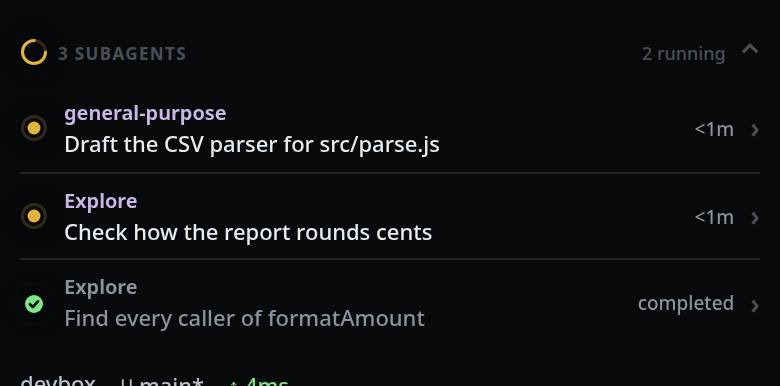
Tap a row to open that subagent's detail.
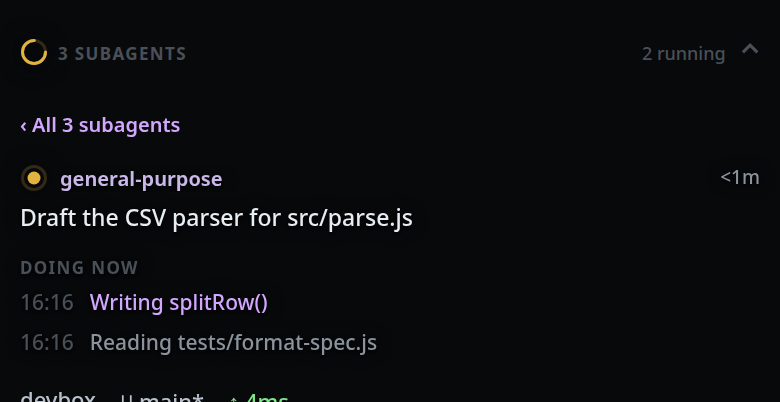
Tap
‹ All N subagentsto go back to the list.When the last one finishes, the collapsed strip reads
completeand the ring turns into a green tick.
What you see
Collapsed: a mark, N SUBAGENTS (#subs-label), and the status
(#subs-status) — either N running or complete. The mark is a spinning
amber ring like a working tab's while any subagent runs. Once all are done it is
a green tick, or a red cross if one of them failed.
Expanded with more than one, a list. Running ones lead, each group in launch
order. Each row is a status mark (an amber dot while it runs, a green check
when it completed, a red cross when it failed), the subagent's name, its task (or its latest activity
line), and on the right how long it has run (4m) or how it ended (completed,
failed). With exactly one subagent the strip opens straight to its detail,
with no list to come back to.
The detail shows the name and time, then the task — or No task details were reported. — then its activity feed under DOING NOW while it runs or WHAT IT DID once it is finished, newest line first with a clock time on each. If the
subagent was launched with a prompt that differs from its task, that follows
under PROMPT.
On the tab strip and in
the thread list, a tab with subagents running
wears its count: an idle tab with agents shows a spinning amber arc, a working
tab the amber dot inside one, and the label reads idle · 2 agents running.
Limits and known gaps
- The feed keeps the last 30 activity lines per subagent. Consecutive duplicates collapse, because codex reports every item twice (started, then completed).
- A finished subagent leaves the strip when the turn ends and none are still running. Background agents outlive the turn that launched them and stay.
- A subagent left running by a process that went away is marked
failedbefore the next turn starts, so the count cannot drift into "38 subagents · 2 running" with nothing running. - A nested subagent (an agent launched by a subagent) is a line on the parent's feed, not a row of its own.
- A subagent's own text, thinking and token usage never reach the transcript.
- opencode does not report subagents.
Related
- plan-strip — the strip above the transcript
- read-the-transcript — the
SUBAGENTtool cards - background-and-resumed-subagents — which rows exist and when they close
- switch-tabs — the count a tab wears
- threads-sheet — the same count in the thread list
- icon-legend — the status marks
- the-three-agents — why opencode reports none