
Follow the plan strip
A band above the transcript (#planstrip) showing the agent's steps: one dot
per step, the step it is on, and how many are done. Tap it open to see the whole
list and what came of each step.
Why you would use it
On a long task the transcript scrolls past faster than you can read it. The strip is the one line that says where the agent is and how much is left, without opening anything.
How to use it
The strip appears as soon as the agent writes a plan. It is not there when there is none.

Tap the summary row (
#plan-toggle) to expand it.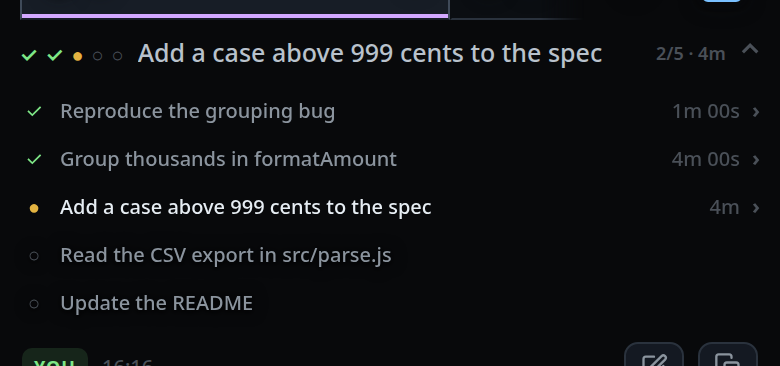
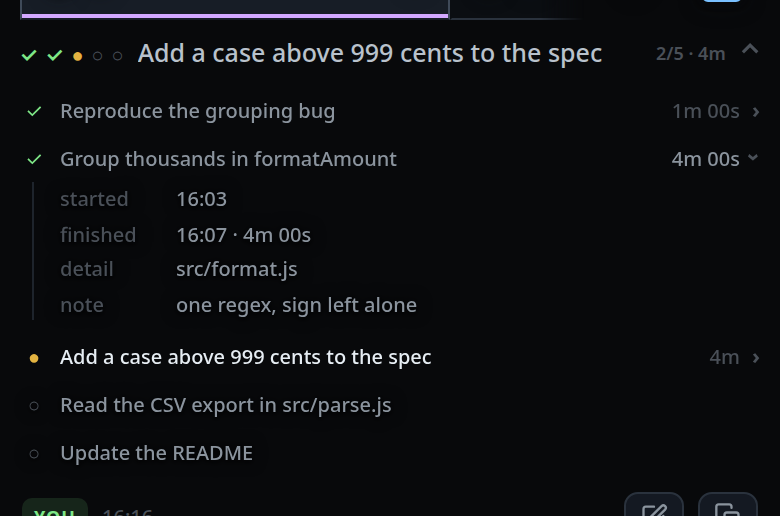
Tap a step row to open its inspector — when the step has something behind it.
Tap the summary row again to fold it.
What you see
Collapsed, three things: the dots (#plan-dots), one per step — ✓ done, ●
running, ○ not started — capped at 20 with +N for the rest; the current step
(#plan-now), which is the first running step, or the first not-started one, or
plan complete; and the count (#plan-count) as 3/7, with the running step's
elapsed time appended when it has one.
Expanded, a row per step: the glyph, the text, and on the right a duration. A
running step shows minutes — <1m, 4m, 1h 12m — because a second-by-second
number under a thumb is noise. A finished step shows how long it took, with
seconds: 42s, 3m 07s, 1h 05m.
A row with something to show is a button with a › cue; tapping it opens an
inspector under the row with the lines the step has:
| Line | When |
|---|---|
started |
a clock time, once the step has been started |
finished |
a clock time, plus the duration when both are known |
detail |
the longer text the agent attached when adding the step |
note |
what came of it, written when the step was finished |
A step with none of these stays a plain row, so tabbing the list only stops where there is something to open.
Expanded strips and open inspectors are remembered per thread, so switching tabs and coming back does not close them.
Limits and known gaps
- A finished list stays on screen after the turn ends — the notes on it are the outcome, and that is what you read afterwards. It clears when the next real turn starts. A compaction turn does not clear it.
- Several steps can be running at once when subagents work in parallel. The collapsed line only has room for the first of them.
- Vendor tools (
TodoWrite,TaskCreate/TaskUpdate, codex'supdate_plan) send only text and status, so steps they write have no detail and no note. Onlyv-code todosets those. - A plan folded before step timestamps existed shows no durations.
Related
- todo-list — how an agent writes the steps
- subagents-strip — the strip below the transcript
- read-the-transcript — the cards under the strip
- floating-chrome — the band the strip sits in
- auto-compact — the turn that does not clear the list
- vendor-slash-commands — the vendors' own plan tools