
Dictate a message
Speak into the composer instead of typing. The words land in the composer at the cursor, and you edit and send them yourself.
Why you would use it
You are holding a phone and the message is longer than you want to thumb in. The mic turns speech into text in the composer. Nothing is sent by voice and no command runs by voice, so a misheard word costs you an edit, not a turn.
How to use it
Tap the mic (
#mic) in the composer row, left of steer and send. The first tap on a device asks the browser for the microphone.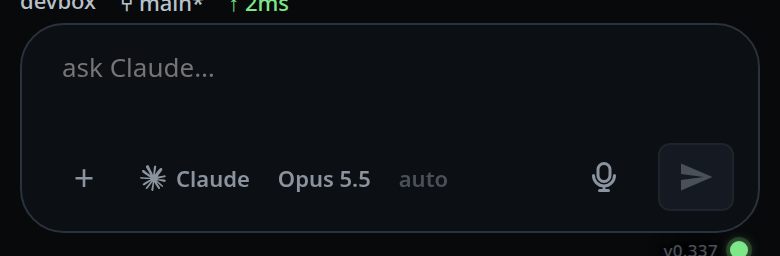
Talk. The button becomes a stop icon with a ring that fills toward the two minute cap. A strip of bars (
#wave) scrolls in from the right as you speak, taller the louder you are, and a dotted line while you are silent. With the composer empty, the strip takes the place of its text line and the composer keeps its height: the strip is 48 px tall on a phone, and the height of the composer's one line on a wide screen. The rest of the composer row stays as it was.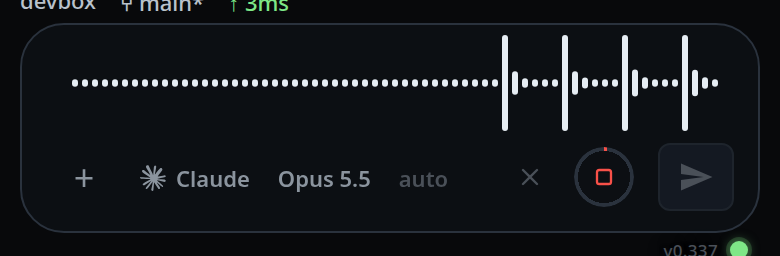
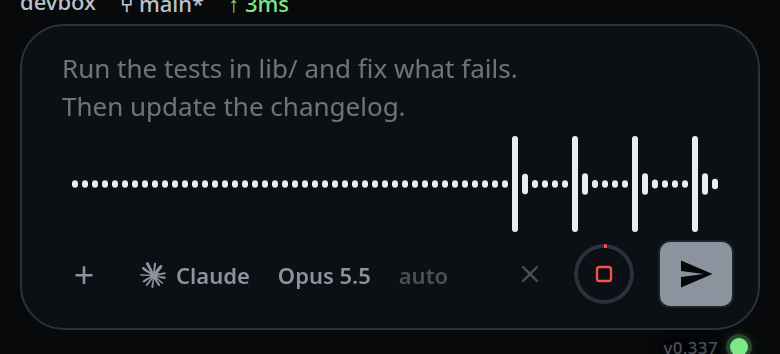
With text already in the box, the text stays in view, dimmed, and a 48 px strip sits under it. The composer grows by 48 px while you record.
Tap it again to stop. It stops by itself after a few seconds of silence, and at 120 seconds whatever happens. The bars freeze and dim until the words arrive; the mic shows the clip going up.
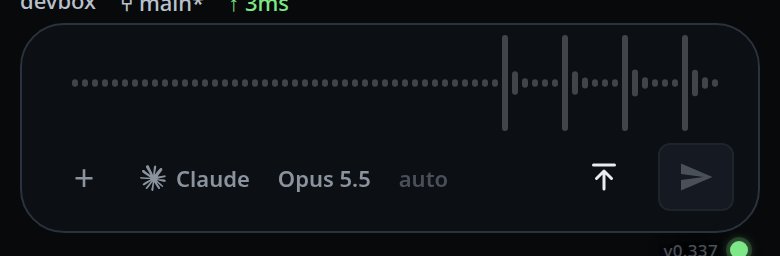
Wait for the words to appear at the cursor. The composer's text line comes back with them. Edit them, then send the way you send anything you typed.
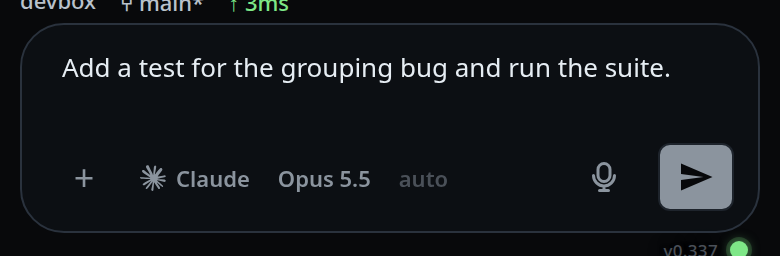
To throw a recording away, tap the × (#mic-cancel) left of the mic — the second
shot above. The composer's text line comes back at once, nothing is uploaded, and nothing
in it changes.
The mic only appears on a box that has the transcription service installed, and
only in a browser that has MediaRecorder and navigator.mediaDevices. Both
are missing on an insecure origin, so a box reached over plain http by IP
shows no mic.
What you see
| State | Button | Label |
|---|---|---|
| Ready | mic icon | Dictate into the message |
| Recording | stop icon, red, ring filling toward 120 s | Stop recording |
| Clip on its way to the server | upload arrow, ring filling when the share is known | Sending the clip to be transcribed, then …, 42% |
| The server transcribing it | waveform icon | Transcribing on this machine |
| A transcription that failed | retry arrow | Retry the transcription that failed |
| Another open tab is dictating, or holds a clip for a retry | mic icon, dimmed and dead | Dictating in another tab |
The strip (#wave) shows from the tap until the transcript lands or fails, and
only in the composer of the tab that started the dictation. Swipe to another tab
and that tab's composer shows its own text. A failed transcription brings the
composer's text line back with its toast. Tapping the mic to retry shows the frozen,
dimmed bars again. A clip under a second that is dropped unsent brings the box
back with heard nothing. Over an empty box, the box stays under the strip,
focused and the same size, so the composer does not change height and the words
still land at the cursor you left. Live text shows no
waveform: its words appear in the composer as you speak.
The × shows while recording and while the microphone is still opening. The mic itself is disabled through the permission prompt, while the clip is being handed over, and while a transcript is out, so the × is the way out of a recording you did not mean to start. On every tab but the one that started the dictation the mic is dimmed and the × is gone — see dictate-while-you-switch-tabs.
Toasts you can see:
heard nothing— the clip came back with no words in it.offline — dictation needs the server— the app has lost the server.microphone permission denied— shown once; a refusal is never retried.no microphone on this devicethe microphone did not open: <reason><what failed> — tap the mic to retryafter a failed transcription.
Where the words go: a space goes in front of them unless the text before the cursor already ends in whitespace, and another behind if a word follows, so dictating into the middle of a sentence does not fuse words together. The cursor is left after the inserted text, so a second dictation continues the first. With no cursor in the box the words go to the end. An empty transcript changes nothing.
Options and settings
| Option | Default | What it changes |
|---|---|---|
Stop after silence — #voice-silence |
3 |
How long a pause ends the recording. 0 stops only on the button. See stop-recording-on-silence |
Show the recording as — #voice-display |
Waveform | Waveform records a clip as described here; Live text types the words as you speak. See choose-the-dictation-engine |
Limits and known gaps
- A recording stops at 120 seconds, silence setting or not.
- A recording under one second that the level meter heard nothing in is dropped without being sent. Everything else is sent, including a clip the meter read as silent: the level threshold is a guess, so it is only allowed to decide when to stop, never whether you said anything.
- Leaving the app (backgrounding the tab) stops a recording and transcribes what was said. A microphone that was still opening is abandoned instead.
- The tap is blocked while the app is offline, with
offline — dictation needs the server. Live text is the exception once its model is loaded: it starts, and skips the correction. - A refused microphone is reported once and not retried: every retry would be another permission prompt you already answered. Grant the microphone in the browser's own site settings and tap again.
- On iOS the recorder produces
audio/mp4; elsewhereaudio/webm;codecs=opus. The server accepts webm, mp4, m4a, ogg and wav. - The clip may not exceed 25 MB; VCode refuses a larger one before reading the rest. That is far past the 120 s cap.
- A recorder that hands over nothing within 3 seconds of the stop is given up on so the button does not stay disabled.
- There is no offline queue for speech. A clip is worth nothing an hour later, so it is never put in the outbox the way a message is — see queue-a-message-offline.
Related
- stop-recording-on-silence — change or turn off the pause that ends a recording
- choose-the-dictation-engine — waveform or live text
- dictate-live — the words as you speak, with live text
- retry-a-failed-dictation — what happens when the transcription fails
- dictate-while-you-switch-tabs — where the words go if you swipe away
- where-your-voice-goes — what is stored and logged
- fix-the-microphone-permission — no mic button, or a refused microphone
- send-a-message — sending what you dictated
- drafts-kept-per-tab — the composer the words land in
- toasts — where the messages above appear