
Stop recording when you stop talking
A recording ends by itself after a set number of seconds of quiet, so you do not
have to reach back for the stop button. The window is a number in the cog, and
0 turns it off.
Why you would use it
You are dictating one-handed and the phone is at your mouth, not in front of
your eyes. Three seconds of quiet ends the recording and starts the
transcription. Set it longer when you think mid-sentence, or to 0 when you
want the recording to run until you tap stop.
How to use it
Tap the cog (
#settings-open) in the top right.Find the Voice group (
#settings-voice).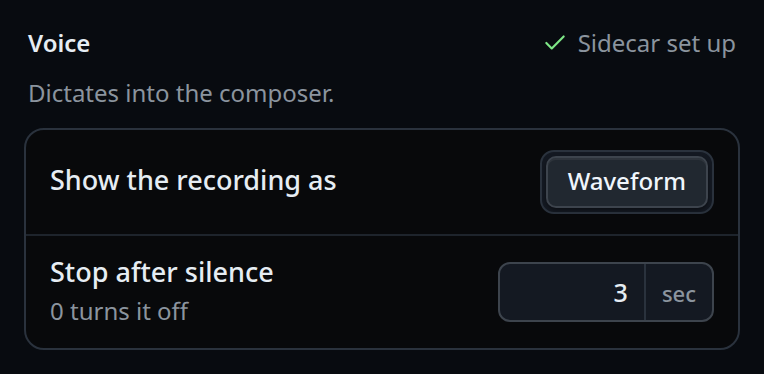
Put a whole number of seconds in Stop after silence (
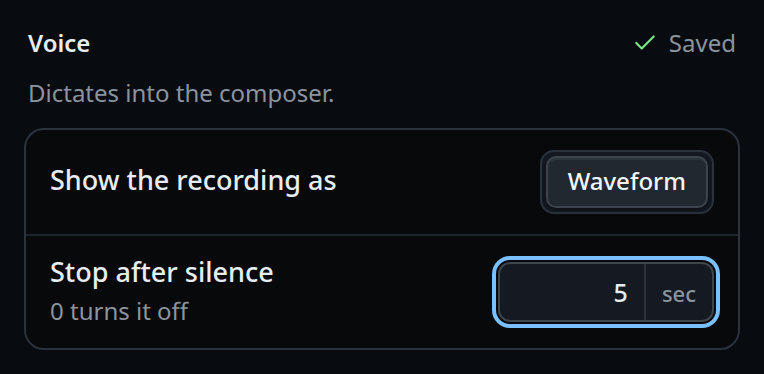
#voice-silence), the field withsecbeside it.0to30; the row's help says0 turns it off.The value saves as you leave the field. The next recording uses it.
What you see
The right end of the Voice title (#voice-hint) shows Saving…, then a green
check and Saved. A bad value shows a whole number of seconds, 0 to 30 there
in red, and the toast the silence window is a whole number of seconds, 0 (off) to 30, and nothing is saved.
While recording, the ring around the stop button fills toward the 120 second cap. There is no separate countdown for the silence window.
Options and settings
| Option | Default | What it changes |
|---|---|---|
#voice-silence (voice.silenceSeconds) |
3 |
Seconds of quiet that end the recording. 0 is off |
| Range | 0–30 |
Anything else is refused by lib/settings.js with voice.silenceSeconds must be a whole number from 0 (off) to 30 |
| Hard cap | 120000 ms |
MAX_CLIP_MS in public/voice.js. Not configurable |
Limits and known gaps
- The setting lives in
settings.jsonon the box, not on the phone, so it is the same for every device signed into this box. - The silence stop is decided by a level threshold (
SPEECH_RMS,0.02) that has never been measured against a real phone microphone in a real room. It is only allowed to decide when a recording stops, never whether anything was said, so a soft voice under the threshold ends the recording early but the audio is still transcribed. - A window of quiet with no speech in it at all also ends the recording. If that
happens in under one second, the clip is dropped without being sent; otherwise
it is sent and comes back as
heard nothing. - If the browser's audio graph cannot be read (a suspended
AudioContext), the level counts as speech and the recording runs to the 120 second cap instead of being cut short. A graph that wakes mid-recording gets its silence stop back from that moment. - The cap applies whatever the setting says, including
0.
Related
- dictate-a-message — the recording itself
- choose-the-dictation-engine — the other knob in the same group
- dictate-live — the live engine counts silence as no new words