
Resume a session you started in a terminal
A claude or codex session you started in a plain terminal can be picked up in VCode. The transcript is imported into a new tab and your next message continues that same session.
Why you would use it
You were working at the desk, you are now on the phone, and the conversation you want is in a tmux pane you cannot reach. Rather than starting over, adopt the session: the agent still has the whole context.
How to use it
- Type
/resume(or/sessions) in the composer (#draft) and send it. The composer empties and the sessions sheet (#sessions) opens, scrolled to the resume list. - Or tap the branch segment in the status bar, and scroll to
the
RESUME A SESSIONsection. - Tap a session. The sheet closes and the tab opens.
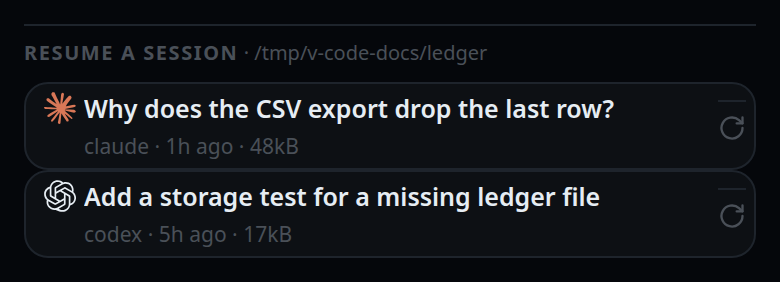
Sessions are listed for one folder: the current tab's working directory, or the server's default.
What you see
While the list loads, the section heading reads RESUME A SESSION · scanning….
Then the hint becomes the folder, for example ~/git/v-code-ide.
Each row shows the agent's mark, the first real thing you typed in that session,
and a meta line: claude · 2h ago · 48kB. With nothing to show the list says
no unattached sessions in this folder.
Tapping shows resuming claude session…, then either
resumed · 132 of 410 items or already open in a thread.
The tab opens at the end of the strip the frame asks for — first on a phone, last on a window at least 760px wide, as a tab from the new-thread card does (start-a-thread).
The new tab opens with a system note:
resumed claude session a1b2c3d4 — showing the last 132 of 410 items; the agent still has the full session,
or — 132 items imported when nothing was left out.
Limits and known gaps
- claude and codex only. An opencode session is refused:
resume does not support opencode sessions. - At most 200 items are imported into the VCode log. The agent keeps its whole session either way; the cap is only on what the transcript shows.
- At most 25 sessions per agent are listed, newest first, and codex scanning stops after the 200 newest rollout files.
- A session with no first prompt is left out: there is nothing to resume into.
- A session already bound to an open tab is filtered out of the list; adopting the same id twice returns the existing tab.
- A tool call whose result fell outside the imported window is shown finished with
the output
(result is outside the imported window). - Near the memory cap the adoption is
refused with
memory 14.2 of 16.0 GB used: close a tab first. - Nothing is written to the vendors' state directories. Reading is read-only.
/resumewith an argument is prose, not a command; it is sent to the agent as a message.- In the vendors' own terminal UIs
/resumeis a CLI built-in. Over this channel a built-in answers "isn't available in this environment", so VCode recognises/resumeitself and opens its own picker instead.
Related
- resume-after-a-restart — what happens to a tab when VCode itself restarts
- the-three-agents — why opencode sessions cannot be adopted
- slash-menu — where
/resumeis listed - threads-sheet — the sheet the picker lives in