
Review code line by line
Gather comments across several lines and several files, then send the lot as one message. The review survives a reload and follows the thread it belongs to.
Why you would use it
Reading a change on a phone, you find four things wrong in three files. Sending four separate messages makes the agent start four times. One review is one turn.
How to use it
Open a file, tap a line, type a comment, and tap Start review.
Keep reading. Every further comment goes in with Add to review.
Open other files from the explorer and comment on them too; the review spans files.
Tap Finish review in the bar at the top of the viewer (
#viewer-review) or at the top of the explorer (#explorer-review).
To throw the review away, tap Cancel review twice.
What you see
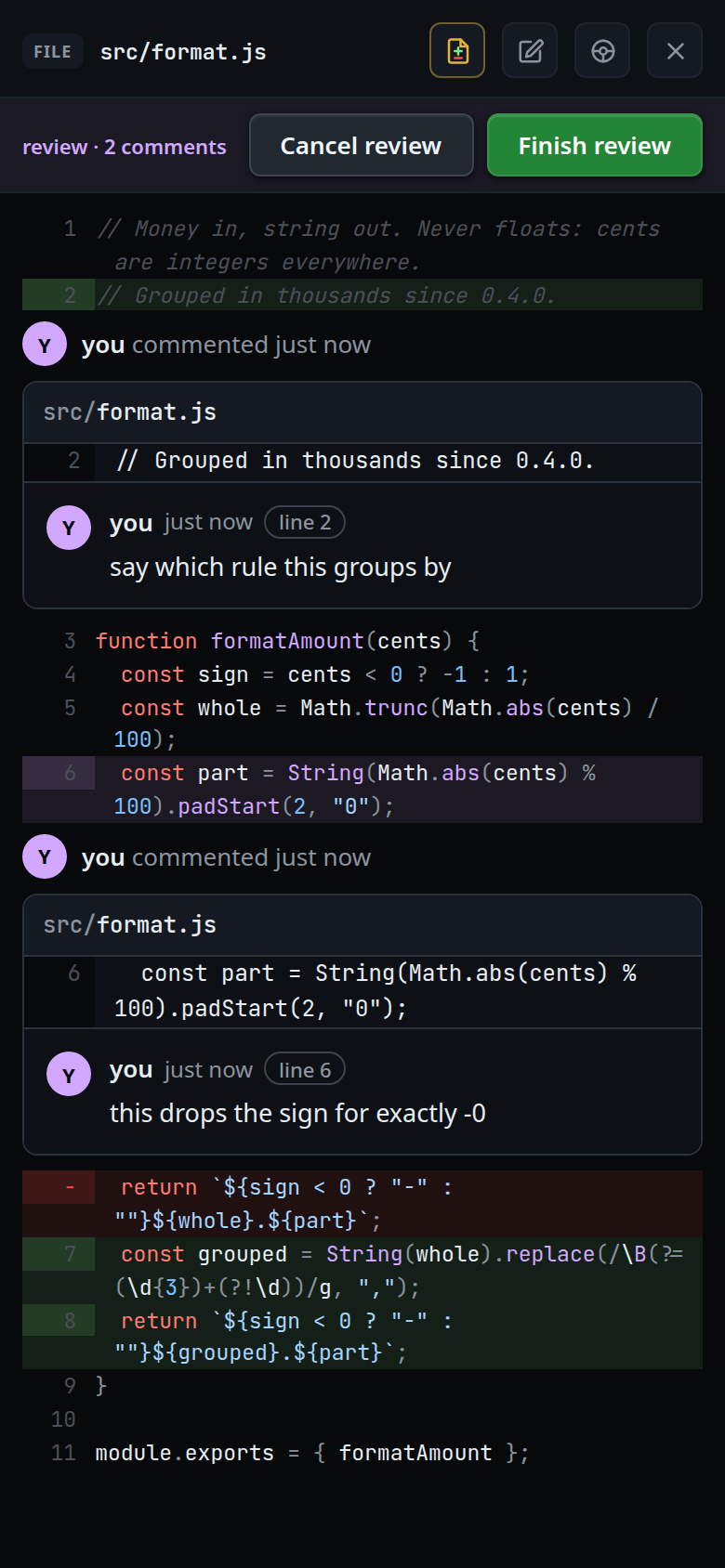
- The bar appears at the top of both panels while a review is open, and reads
review · <n> comments. On a phone the two buttons take the width they need and the count is clipped to fit:review · 2 comme…. - A commented line is tinted violet, and the comment shows as a review card
under it. The card's head reads
you commented 6 minutes agobeside your avatar, the first letter of your account's email. Under it: the file path, the line number and the quoted line, thenyou, the time, aline <n>badge and your comment. Tapping the card opens the box again to reword or remove it. - The time counts from when you last wrote the comment:
just now, then minutes, hours and days. A comment saved before comments carried a time reads justyou commented, with no time. - A comment whose line has moved is put where the line is now. One whose line
cannot be found any more keeps its number, and its card shows an
Outdatedpill beside the file path. - Cancel review with comments to lose arms first: it turns red and reads
Discard <n>?for three seconds. The second tap drops them. - On finish, the viewer and the explorer both close and the
toast reads
review sent. Offline it readsoffline — review queued in outbox; refused for want of a login it readssign in — the review is queued.
The message the agent receives:
Code review, 2 comments:

1. lib/runner.js:42
> const TIMEOUT = 10_000;
this is too short for a cold start

2. lib/runner.js:88 (the line has changed since)
> return drain();
drain can throw here
Comments are sorted by path, then by line number.
Limits and known gaps
- Comments are added and shown in read mode only; in edit mode the cards are hidden until you tap Done.
- One review per thread. Switching tabs switches the review with it; each thread keeps its own.
- The review is kept in the browser's
localStorageunderv-code-review:<threadId>, so it survives a reload but lives on that device only. Private mode or a full quota loses it on reload; nothing else breaks. - A comment written while a send was in flight is not part of that send and stays under review.
- Finish does not close the panels if a comment box is still open or another comment has since been started.
- A stale comment's line number may point at something else by then; the quoted
line is what the agent should go by, which is what
(the line has changed since)says. - The review is sent with mode
queue, without the composer's attachments.
Related
- comment-on-a-line — a single comment, sent at once
- viewer-diff-marks — reading the change you are reviewing
- file-explorer — where the bar's other copy sits
- diff-review-sheet — accepting a patch instead of commenting on it
- queue-or-steer — when the sent review runs