
Run a command from a code block
A bash code block in a reply carries a run control beside its copy button. One tap sends the block to the tab's shell pane and runs it there.
Why you would use it
The agent just gave you the command — npm test, the migration, the restart —
and retyping it on a phone is where the typo happens. Copy-paste works, but it
is two trips; this is one tap.
How to use it
Find the bash block in the reply. The run control is the terminal-prompt mark (
button.run) in the block's header bar, beside the copy icon. It appears once the fence has closed — while the answer is still streaming, with no closing fence yet, there is no control, so a tap can never run half a command.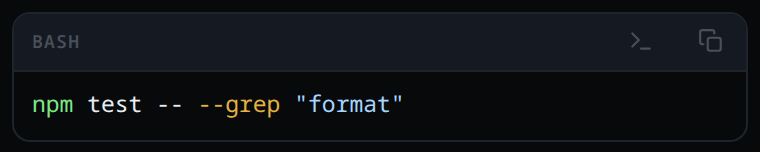
Tap it. The app switches to the shell pane and runs the block there.
What you see
- The composer clears nothing; the shell pane opens with the command typed and running.
- A toast:
ran <first line> in the shell, naming the block's first non-blank line (cut at 60 characters) rather than the whole block. - If the shell refused it — no tmux — the toast names the failure instead
(
shell unavailable: …) and nothing runs.
Limits and known gaps
- Only bash blocks get the control: a fence labelled
bash,sh,zsh,shell,consoleorterminal, or an unlabelled fence the app reads as commands. Every other language stays copy-only. - The whole block runs as typed, line by line. A
$prompt prefix in front of a line is stripped; anything else, including comments, goes to the shell. - An empty block has no control: there is nothing to run, and a bare
Enterwould submit whatever half-typed line the pane already holds. - The control appears on bash blocks in tool output too, not only in replies.
- It runs now, in the tab's own shell: it never joins the message queue, and it runs whether or not a turn is running.
- Keys go into the live pane, so a tap appends to an unsubmitted line already sitting there instead of starting a fresh one — the same as typing into shell mode yourself.
- There is no confirmation step. Anyone who can log in already runs code as your user (see approvals are bypassed), so the tap is the confirmation.
Related
- copy-from-the-transcript — the copy button beside it
- formatted-answers — the blocks this control sits on
- bang-command — running a command without leaving the thread
- shell-mode — the pane the command runs in
- toasts —
ran … in the shelland what it looks like when it fails