
Formatted answers and coloured code
Replies render as markdown: headings, lists, tables, quotes and fenced code. Code is syntax coloured, and so are shell commands in a tool card's header and the lines of a diff.
Why you would use it
A phone screen is small. A wall of unrendered markdown with ** and backticks
in it costs more to read than the answer is worth, and a 40-line file printed by
Read is unusable without a gutter and colour.
How to use it
Nothing to switch on. It applies to every reply, every tool output and every patch.
Read the reply.

Tap the copy icon in a code block's header bar to copy just that block.
Tap a link to open it in a new tab.
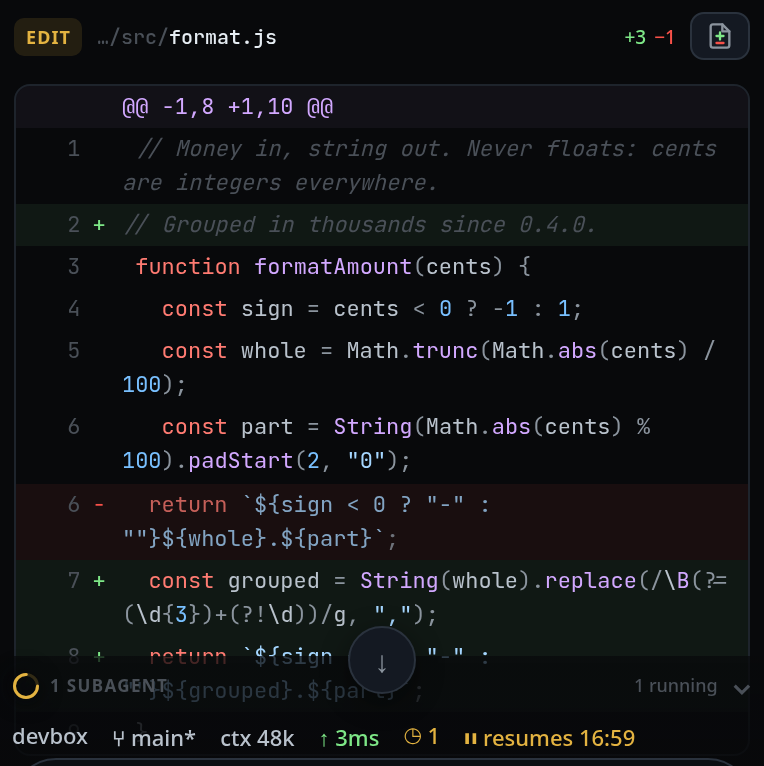
An edit renders the same way, as a patch:
What you see
Rendered from an answer: headings (four levels), bullet and numbered lists
including nested ones, tables (a wide one scrolls sideways inside the card),
blockquotes, horizontal rules, **bold**, *italic*, ~~strike~~, inline
code, and links. A bare URL becomes a link, and so does a bare host:port — the
shape a dev server prints.
A fenced code block gets a header bar showing the language (or text) and a
copy button. A fence with no language is guessed: shell when the content is
commands, otherwise from the content.
Tool output is decided in this order: an MCP envelope is unwrapped, real escape
bytes claim the terminal renderer, then structure — a numbered Read listing
keeps its line-number gutter, grep hits keep theirs, fenced blocks are split out
— and only then language, taken from the title's extension when the body could
plausibly be that file.
A diff renders as three columns: line number, +/− marker, and the content
coloured as the language of the file being changed. Line numbers appear only
when the patch carries an @@ header; claude reports edits as old/new strings,
so its synthesized patches have none.
Options and settings
| Option | Default | What it changes |
|---|---|---|
| fence language | guessed | the label on the block and the lexer used |
Languages with a grammar: JavaScript and TypeScript (js, ts, jsx, tsx,
mjs, cjs), shell (sh, bash, zsh, console, terminal), Python, JSON,
CSS and SCSS, HTML and XML and SVG, diff and patch, YAML, SQL, Markdown, and
INI-shaped files (ini, toml, env, systemd, service). Anything else
renders as one plain block.
Limits and known gaps
- Images render only from VCode's own screenshots folder. See inline-screenshots.
- HTML in an answer is never interpreted. Every node is built from the DOM API,
never from
innerHTML, because agent output is untrusted text. - Underscores inside a word do not become italics.
- An unclosed fence is treated as code to the end of the text, because that is the normal state of a streaming answer.
.htmlin a tool title is a weak claim: when a body looks like script rather than markup, the JavaScript lexer is used instead.
Related
- terminal-output-and-links — ANSI colour and one-tap link copy
- copy-from-the-transcript — the copy buttons
- run-a-command-from-a-code-block — the run control on bash blocks
- read-the-transcript — the cards this renders into
- inline-screenshots — the one image source markdown will render
- diff-review-sheet — the whole patch, not the card's first lines
- file-viewer — the same colouring over a whole file