
Work on several boxes in one app
In the VCode app on app.v-code.dev, every box on your account opens at once. Their tabs share one strip, each tab works with its own box, and you pick the box when you start a new tab.
Why you would use it
You run agents on more than one computer: a desktop, a laptop, a server. You want to watch and steer all of them from one phone without switching between boxes, and you want a box that is off to leave the others alone.
How to use it
Open app.v-code.dev. Every box on the account connects at start. Its tabs join the strip (
#tabstrip), in the order you last left them on this device.To start a tab, tap the plus (
#new-tab). The New thread row starts with a box pick (.new-box), ahead of the agent (.new-agent) and the folder (.new-cwd). It shows the active tab's box. Tap it and pick another box from its menu (.new-box-menu). The agents and the folder list in the form are then that box's.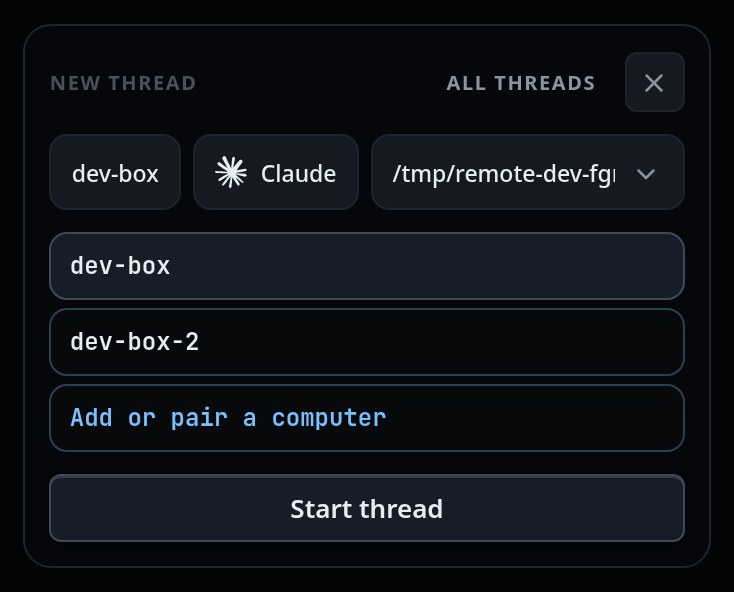
Tap Start thread (
.new-thread). The tab is made on the picked box.To add a box, tap the box pick and then Add or pair a computer (
.add-box), the menu's last entry. The box list opens over VCode. A box linked since the page loaded reloads the page with its tabs in the strip; one that asks for pairing shows its pair screen (use-the-app). Or add a new computer (add-a-computer). Close (#rs-close) returns to VCode as you left it.Drag a tab to move it anywhere in the strip, next to tabs of any box (reorder-tabs).
What you see
A badge on each tab (
.tabbox) while the strip holds tabs from more than one box. It is two letters or digits from the box name, upper-cased, and different for each box:dev-boxanddev-box-2readDXandD2. Hold the pointer on it and its title is the full box name. With tabs from one box only, no badge shows. The tab drawer shows the full name on each row (.wsbox) under the same rule.
An unavailable tab (
.tab.unavailable) belongs to a box the app cannot use right now. It stays in the strip, faded and struck through, and opens from the transcript cached on this device. Its title says why:Connecting to the box…while the app opens the box for the first time.This box is offline.once that first open has failed, for a box that is off when the app starts, and when the box was open and dropped. The app keeps trying.- The box's refusal:
This box asks for pairing. On the box, run v-code box pair and type the code it shows.,This box's key changed. Pair it again.,This box runs an older version. It updates itself within the hour.orReload the app to talk to this box.
In an offline or connecting box's tab the banner reads
offline · thread served from cache, and what you send waits in that box's own outbox (N queued) until the box is back. The tab comes back to life without a reload.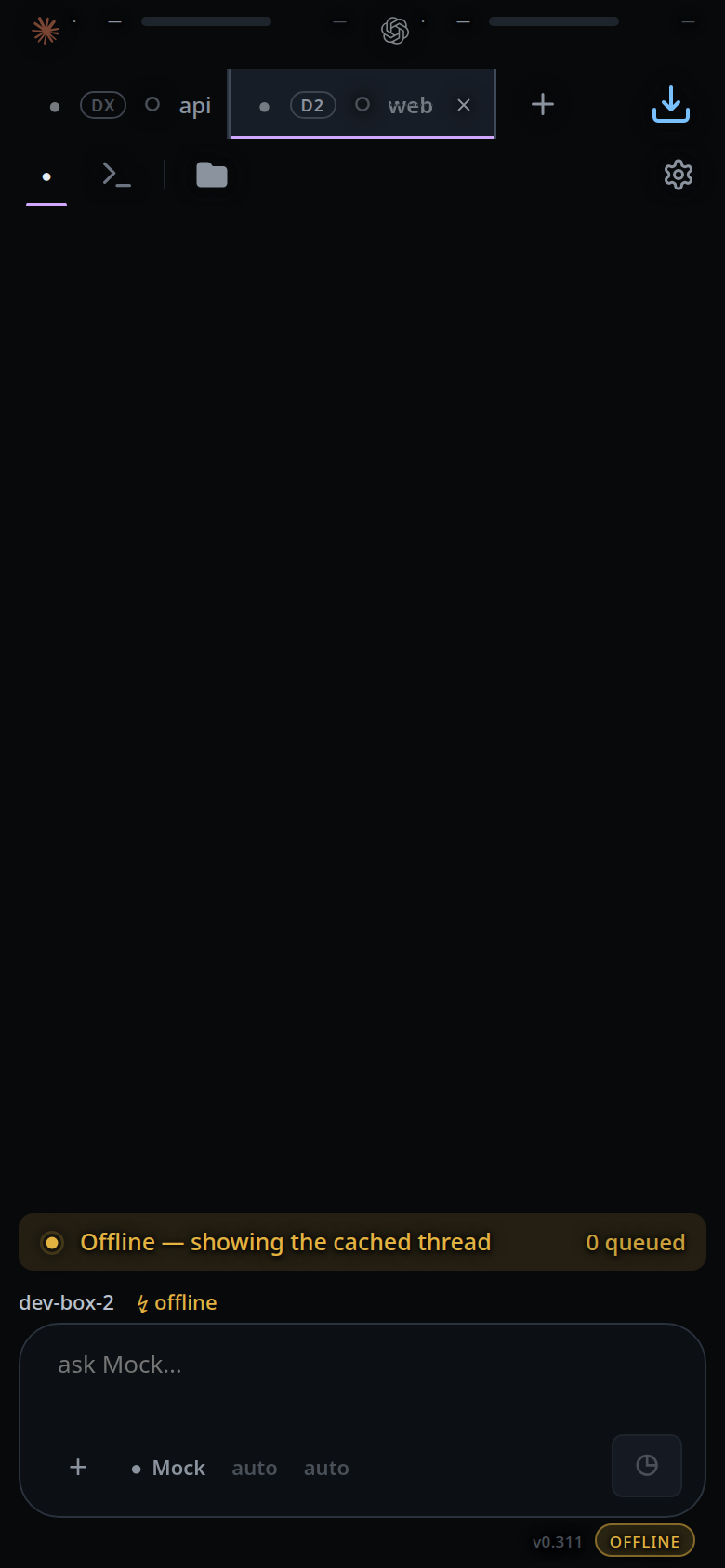
Closing an unavailable tab works like closing any tab: the cross, the drawer row's close, Ctrl+W. The tab leaves the strip at once. The close is kept on this device only, and sent to the box when it answers again; then the tab is in that box's Closed list. Until then it is in no Closed list, and other devices still show it open: close it on each. A close the box refuses (the thread is gone) is dropped.
The tab comes back when its box answers more than 24 hours after you closed it: the close is not sent, and you decide again. It also comes back when the close fails three times, 30 seconds apart at least. A box removed from the account on v-code.dev takes its kept closes with it.
In a refusing box's tab the banner shows the refusal, and send and attach are off. Enter, a pasted file and
/newshow the refusal as a toast; your text stays in the composer. A slash command the page answers itself, such as a bare/model, still works.The box menu marks a box that has not opened yet, with
Connecting to the box…or, after a failed open,This box is offline., and one that refused this device, with its reason. These are disabled. A box that was open and is offline now saysoffline.Everything that is not a tab follows the active tab's box: the settings sheet, the usage meters, the shell panel, the file explorer, dictation (the mic shows when that box has a transcription service) and the machine name on the row under the composer's keys (
#composer-facts .seg.node), which names the box (machine-name). Tap it on a box that refused this device and that box's screen opens: its pair screen, key screen or version screen.Agent logins belong to a computer. The settings sheet's Agents group picks which computer's logins it shows (
#agents-box), and a logged-out tab logs in on its own computer (log-in-to-an-agent).
Options and settings
None. The strip order and the closes waiting for an unavailable box are kept on this device only. Each box is still told the order of its own tabs.
Limits and known gaps
- The box is chosen when the tab is made. A tab cannot move to another box.
- A folder typed in the form belongs to the box picked while you typed it.
Start on another box refuses it:
that folder is on <box>, not <box>: pick it again. - A lapsed plan or an expired login still covers the whole page; only a box's own refusals stay on its tabs.
- A box removed from the account is not connected, and its tabs are not shown.
- On a box's own page (not the app) there is one box: no box pick and no badge.
- Every box on the account is opened while the app is open: one channel per box over the app's one socket to the router, and one replica per box on the device.
Related
- use-the-app — log in and pair the first box
- add-a-phone — the pairing code on each box
- add-a-computer — add another computer from the box list
- start-a-thread — the rest of the New thread form
- reorder-tabs — dragging tabs in the strip
- machine-name — the machine name on the composer's bottom row
- log-in-to-an-agent — each computer's agent logins