
See which files changed, in the tree
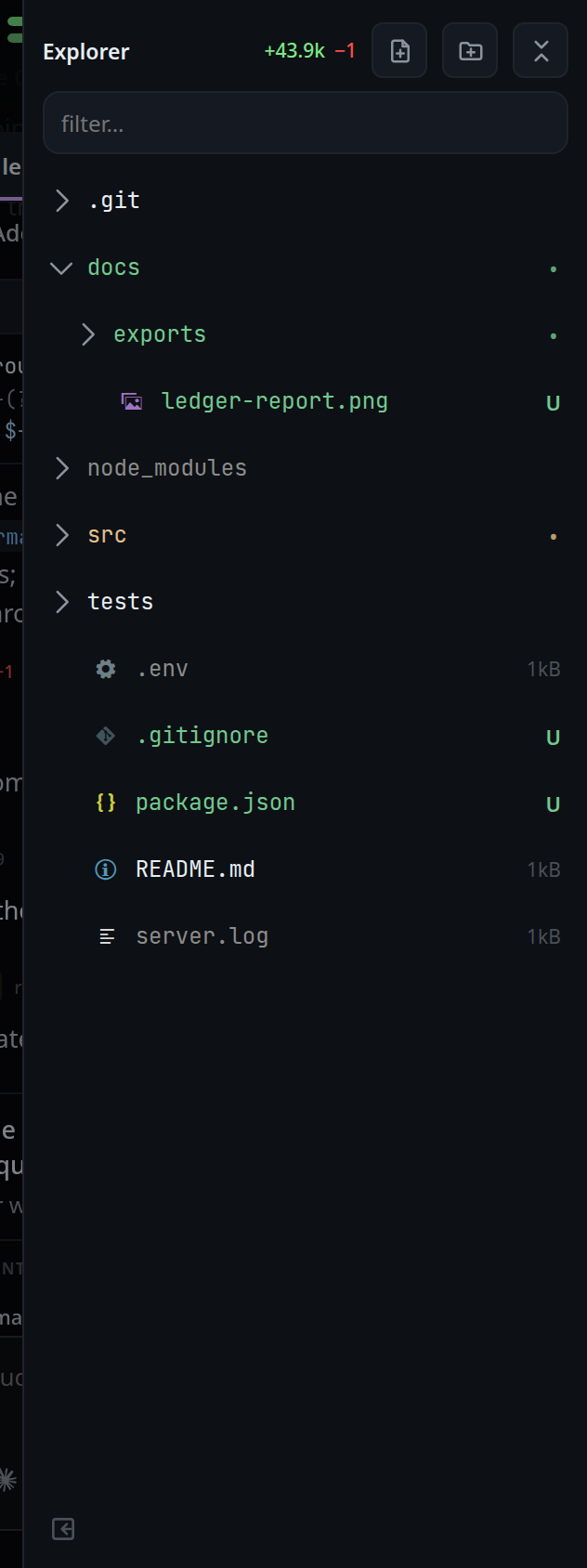
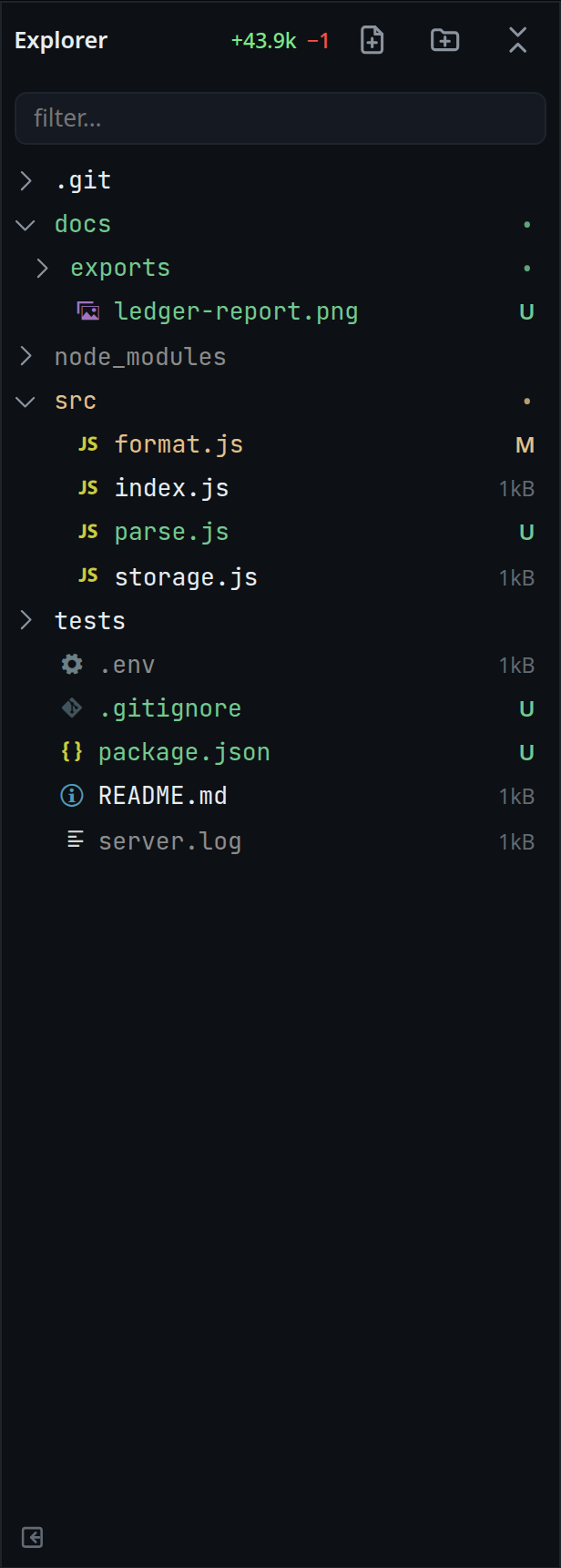
The explorer marks changes the way VS Code does: a changed file's name takes a
colour and a letter (M, U, A, D) at the right end, a folder above it takes
the colour and a dot, and what git ignores is grey. The header shows the total
+12 −3 for the whole folder.
Why you would use it
You come back to a thread and want to know what the agent touched before you read anything. The colours point you at the files worth opening, without asking the agent and without a terminal.
How to use it
- Open the explorer (
#files-open). The changes are read on open. - Open folders; the marks refresh as you go.
- The whole-folder total sits in the header (
#explorer-delta). - Long-press a row on a phone, or hover it on a desktop, to see its own count in
its title:
src/format.js — M +3 −1.
What you see
A changed file's name and its letter take the colour of what happened to it. The colours are VS Code Dark Modern's:
Letter Meaning Colour Mmodified since the last commit #E2C08DUuntracked: new, not yet added to git #73C991Aadded: new and staged #81B88BDdeleted #C74E39A folder with changes under it shows a dot (
•), a little dimmer than a letter. It takes the colour of the strongest change inside it: modified if anything under it is modified or deleted, else untracked, else added.A file or folder git ignores, and everything under an ignored folder, is grey (
#8C8C8C) with no letter. A change beats ignored: a tracked file inside an ignored folder still shows its letter.The letter takes the place of the file's size; an unchanged file keeps its size.
The row's title carries the count:
+<added> −<removed>, and a dot (●) for a file git could not count, such as a binary one. A count of a thousand or more is shortened:1.2k.The header (
#explorer-delta) shows the total for the whole folder, added in green and removed in red.A folder that is not a git repository shows no marks anywhere, and no error.
Filter results carry the same marks as the tree. See find-a-file.
Options and settings
| Option | Default | What it changes |
|---|---|---|
| Refresh throttle | 2000 ms | The shortest gap between two reads while you tap around. Opening the panel forces a read regardless |
| Untracked read budget | 16 MiB per call, 2000 files | How much untracked content is read to count its lines |
| Per-file count cap | 2 MiB | An untracked file past this is marked changed with no count |
| Worktrees read | 24 | Linked worktrees inside the folder that are measured |
Limits and known gaps
- The comparison is with the last commit, staged and unstaged edits both counted. In a repository with no commit yet, everything in it is added.
- An ignored file is drawn grey but has no count. An untracked one counts as all added lines.
- An untracked symlink is marked changed without counting what it points at.
- A failed read of the counts leaves whatever was on screen and says nothing: the listing itself is still right.
- Counts are for the thread's folder and below. From a folder inside a repository, only what is under that folder is counted, named from it.
- A linked git worktree inside the folder (
worktrees/<name>/) is read too and its files are named from the folder. A worktree branch merged with a merge commit stops showing; one merged by squash or rebase keeps showing until its worktree is removed, because git has no shared commit to say it landed. - A clean filter the repository sets (git-lfs is the usual one) still runs on a dirty file. git has no switch for it.
- The read times out after 10 seconds and stops at 32 MB of git output.
Related
- viewer-diff-marks — the same change, line by line
- file-explorer — the tree the marks sit in
- find-a-file — the filter, whose results carry the same marks
- turn-changes — what one turn changed
- thread-working-folder — the folder the counts are taken from